AI CHAT Platform
AI Chat Thread Map
Project description
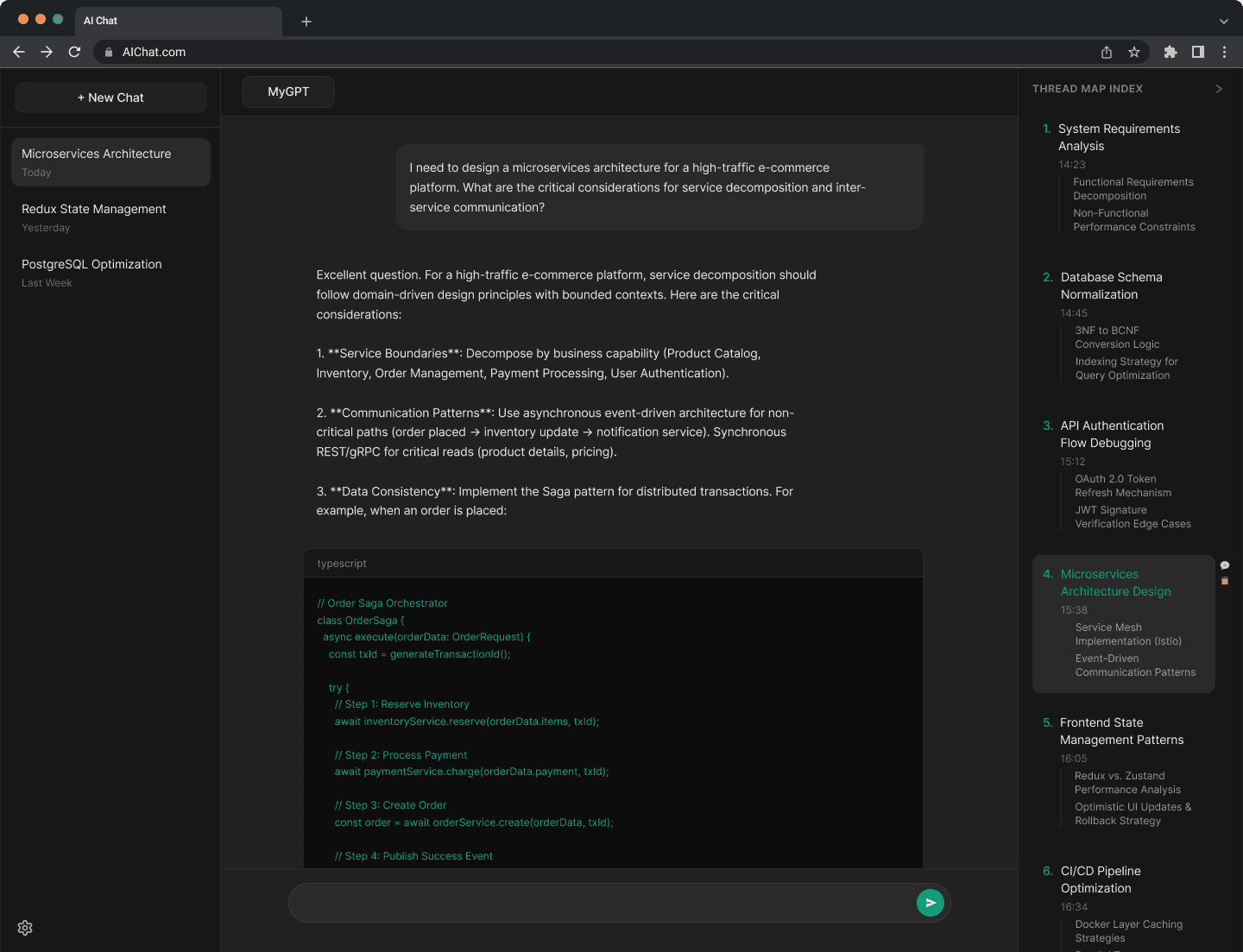
As AI conversations scale from simple Q&A to long-form collaborative projects, current linear "chat" interfaces fail to support efficient data navigation. This project introduces a non-linear navigation system, the Thread Map, designed to transform chaotic "infinite scrolls" into structured, navigable workspaces.
Problem
The "Scroll of Death"
In threads exceeding 25+ messages, users experience a 40% increase in cognitive load. The lack of a hierarchical index forces power users to manually scroll to find past responses, requirements, or logic, leading to "Search Fatigue" and broken "State of Flow."
Process
Process
This category details the step-by-step approach taken during the project, including research, planning, design, development, testing, and optimization phases.
I utilized an expanded Double Diamond methodology, integrating Human-Computer Interaction (HCI) principles to ensure the solution was both technically feasible and user-centric.
Discover
System Exploration
Research & Benchmarking: Audited how high-density technical tools (VS Code, Notion) handle information hierarchy and deep-linking.
Quantitative Surveying: Distributed a structured survey to 50 active AI users to identify baseline pain points and Context Drift frequency.
Stakeholder Analysis: Identified the needs of "Power Users" versus "Casual Users" to prioritize feature scalability.
Define
Information Architecture & Modeling
Thematic Synthesis: Used Affinity Mapping in Miro to group qualitative interview data into core pillars (e.g., "Keyword Amnesia," "Interaction Fatigue").
Information Architecture (IA) Mapping: Developed a structural taxonomy to determine how raw chat tokens would be categorized into AI-summarized headers.
Persona & Journey Modeling: Constructed the "Alex" and "Sarah" personas and mapped the Cognitive Friction points in a standard 2 hour coding session.
Develop
Iterative Prototyping
Low-Fidelity Ideation: Conducted rapid low-fidelity prototyping sessions in Balsamiq to explore non-intrusive navigation patterns (Sidebars vs. Overlays).
A/B Test Design: Defined the parameters for two distinct UI variants to test "Persistent Navigation" vs. "Progressive Disclosure."
Deliver
Validation & Performance Analysis
High-Fidelity Prototyping: Built a fully interactive, platform-agnostic prototype featuring variants for A/B Testing.
Usability Testing: Ran moderated sessions to collect Performance Metrics (Retrieval Speed, Cognitive Load).
Heuristic Evaluation & Refinement: Conducted a final pass to ensure the design met accessibility standards and minimized the NASA-TLX cognitive workload scores.
Research & Insights
User Survey
Conducted an unmoderated survey of 50 active AI users via LinkedIn and through University of Maryland
82%
Reported frustration with scrolling in threads over 20 messages.
65%
Started new chats just to avoid the UI mess, losing valuable project context.
Sample Research Questions
Survey Questions (Quantitative)
1) "How often do you use AI Chat Systems for tasks requiring more than 20 prompts in a single session?" (Likert Scale)
2) "On a scale of 1 to 5, how difficult is it to locate a specific piece of information from earlier in a long conversation?"
3) "Which method do you currently use to find past data? (Scrolling, Browser Search, Starting a new chat, copy-pasting to other apps)"
4) "Have you ever abandoned a chat because it became too difficult to navigate?"
Interview Questions (Qualitative)
1) "When reviewing work or complex AI outputs, how does the current linear layout affect your ability to verify specific technical milestones?"
2) "Can you walk me through your survival strategy'for managing a massive chat thread during a project?"
3) "If this chat had a Table of Contents, which specific elements (code blocks, definitions, summaries) would be most important for you to see at a glance?"
4) "Can you describe the exact point where you feel lost in a conversation?"
Key Insights
Keyword Amnesia
Users remember the context (e.g., when we fixed the bug) but not the specific syntax, making browser "Find" (Cmd+F) ineffective.
Visual Monotony
The repetitive look of chat bubbles makes it hard to distinguish sections of a conversation.
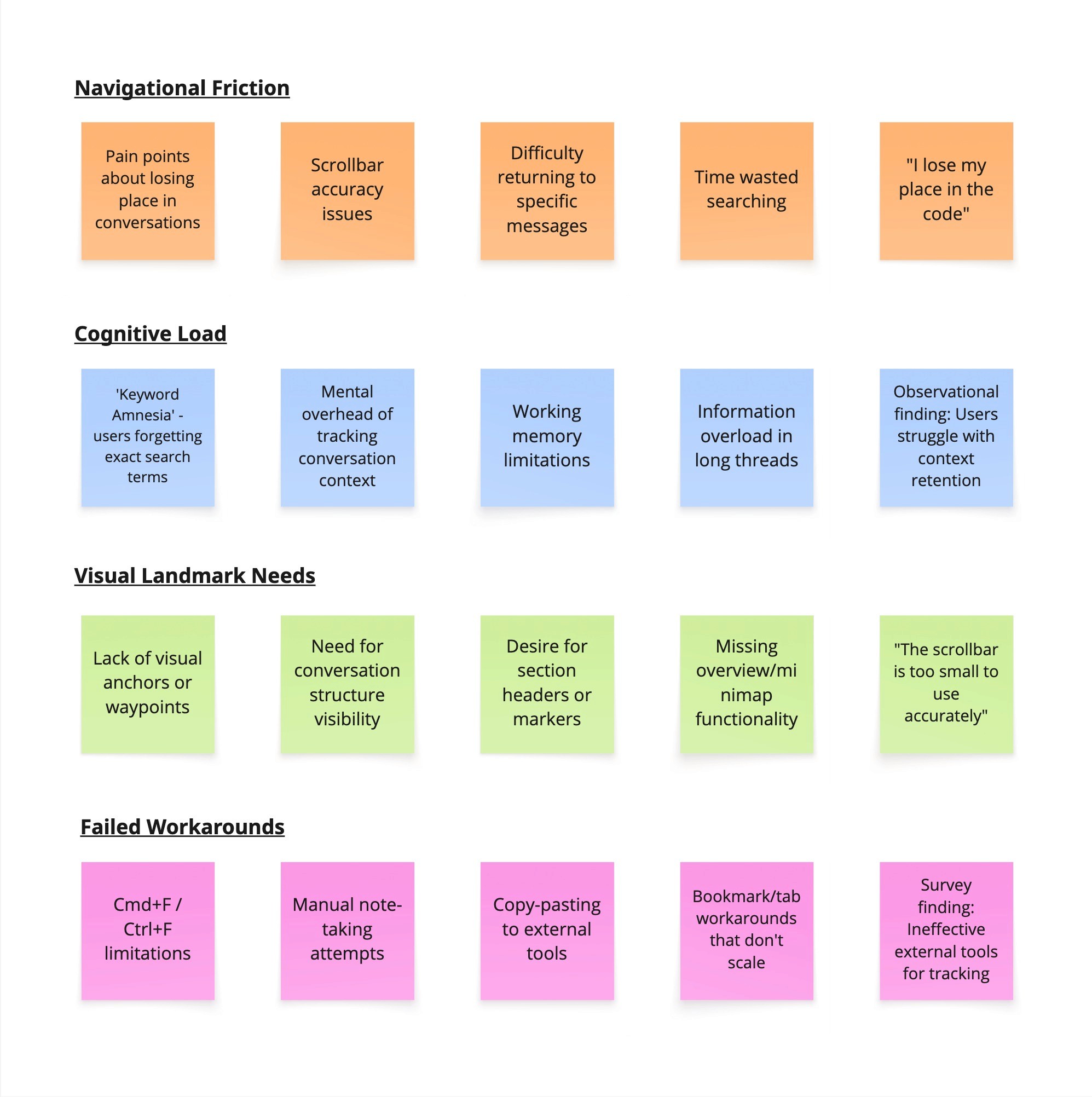
A screenshot of a Miro board with clusters of colorful sticky notes grouped by themes like "Navigational Friction," "Cognitive Load," "Visual Landmark Needs" and "Failed Workarounds."
Empathy Map
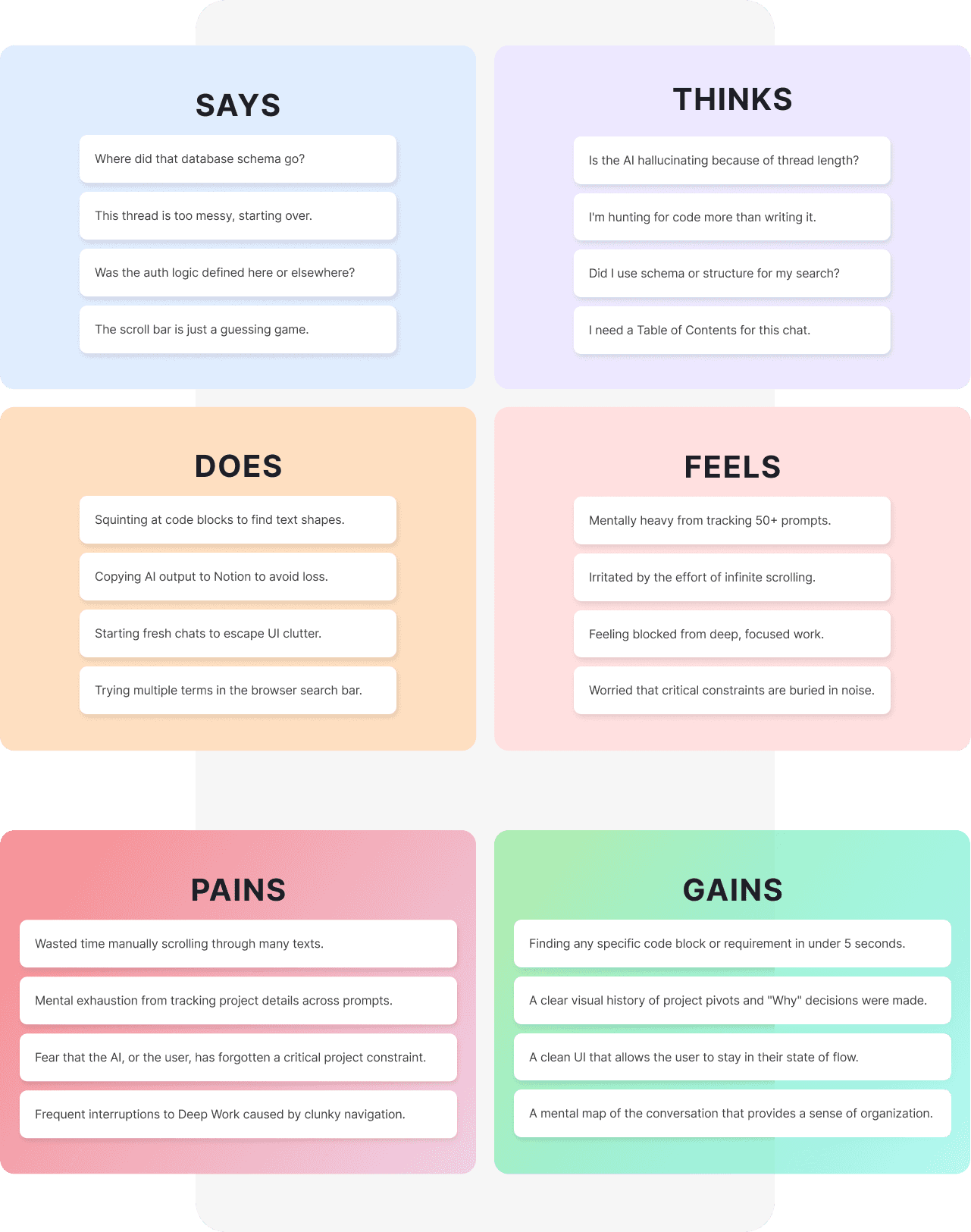
A quadrant diagram showing what users Say, Think, Do, and Feel during long chat sessions.
Personas
Personas
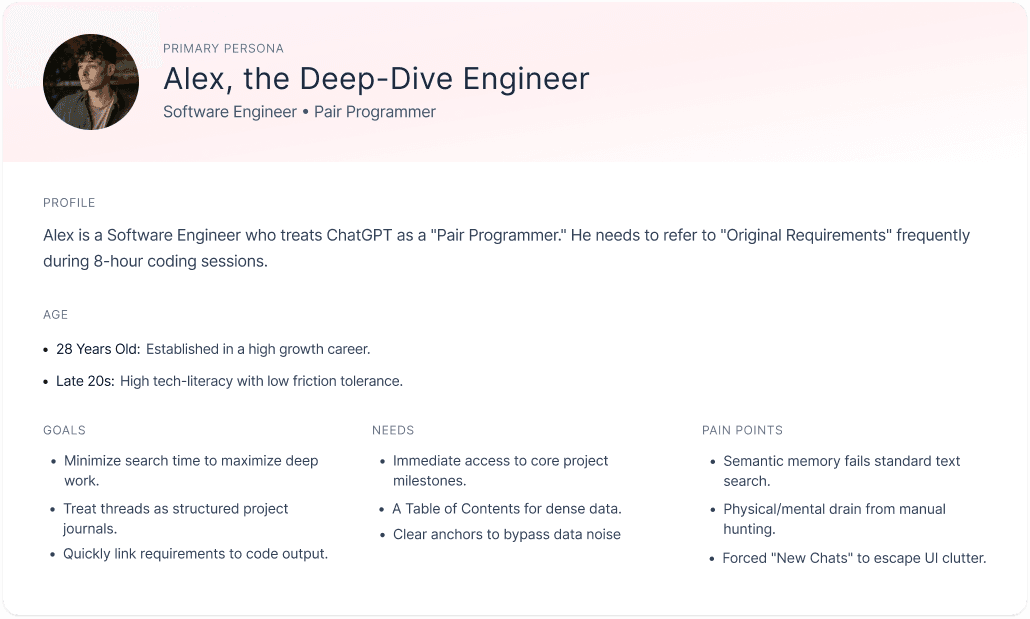
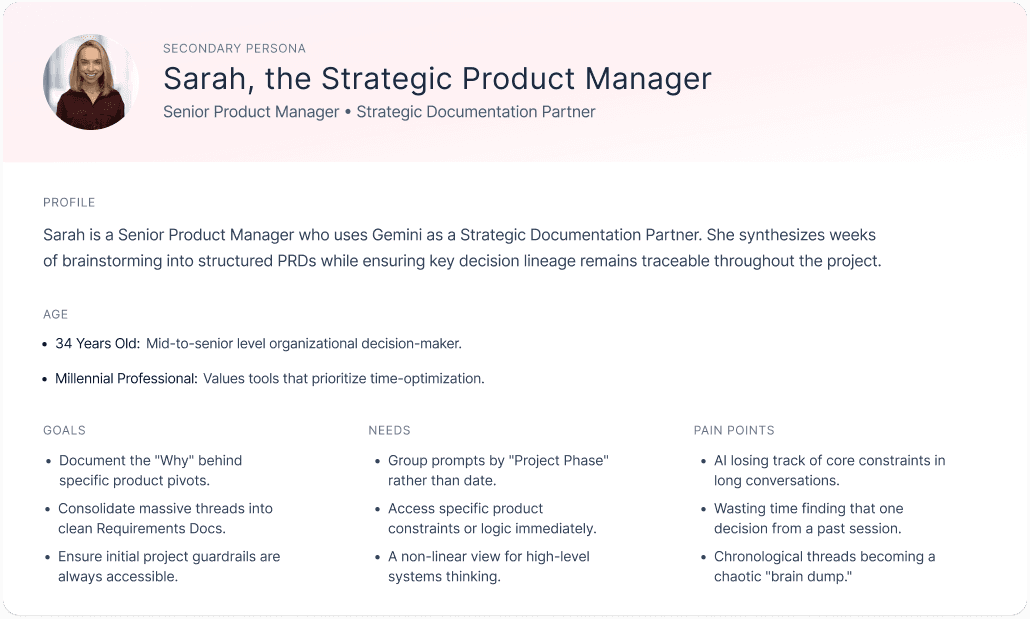
Information Architecture
Moving AI Chat System from a "Casual Chat" mental model to a "Relational Knowledge Base."
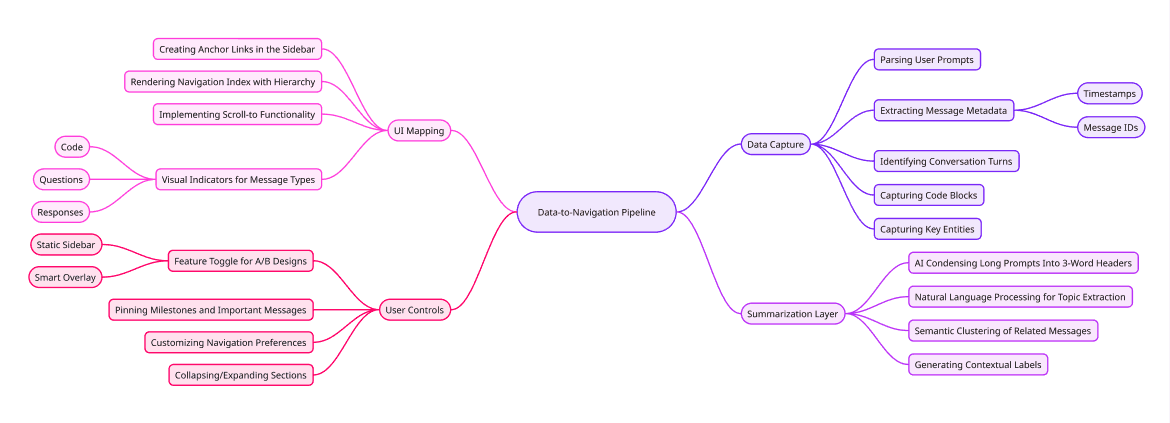
A logic tree showing the system pipeline: Raw Data Input -> AI Summarization Layer -> Navigation UI Output.
Ideation & Execution
Explored two ways to display the map: Right Rail and Floating Button
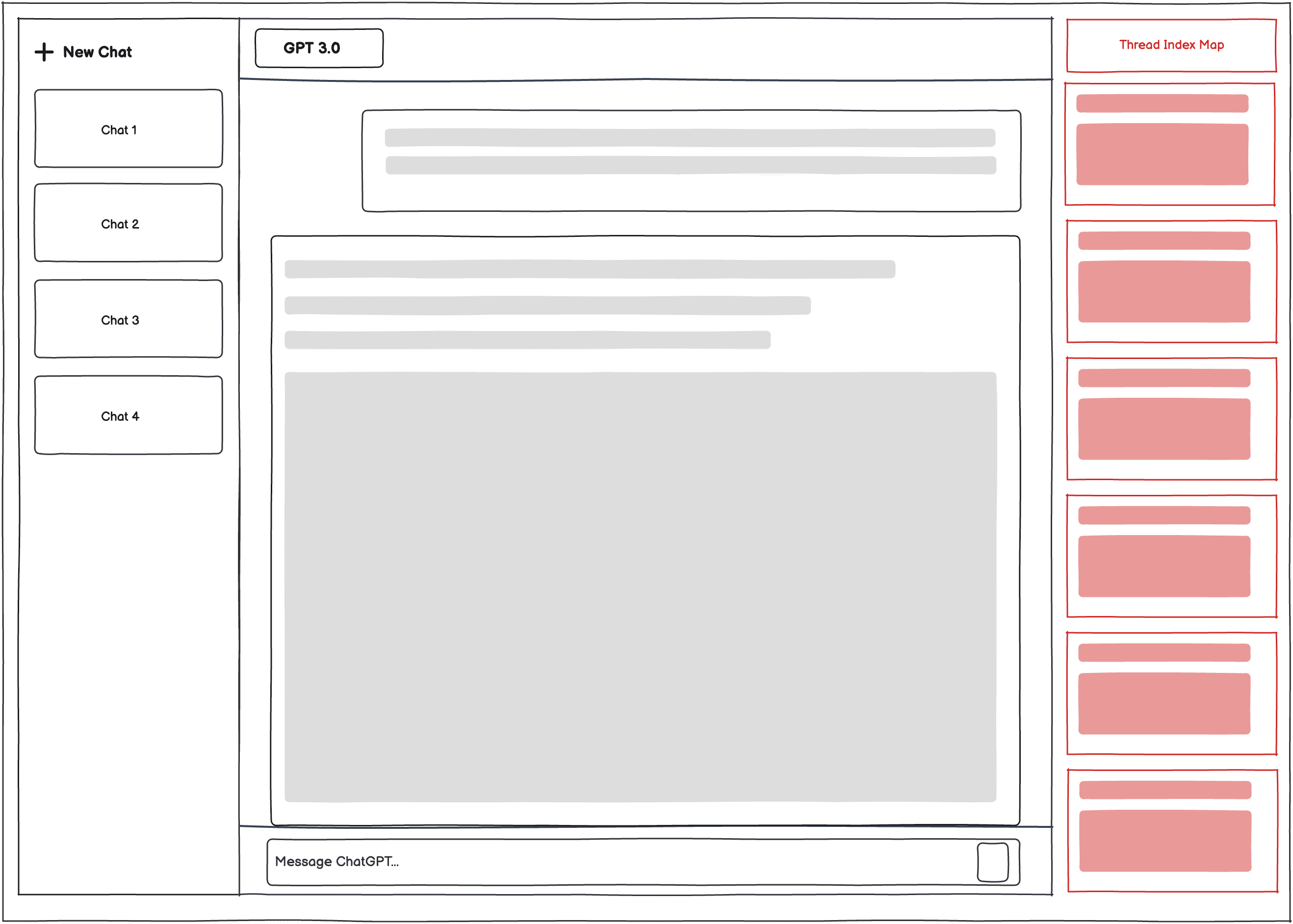
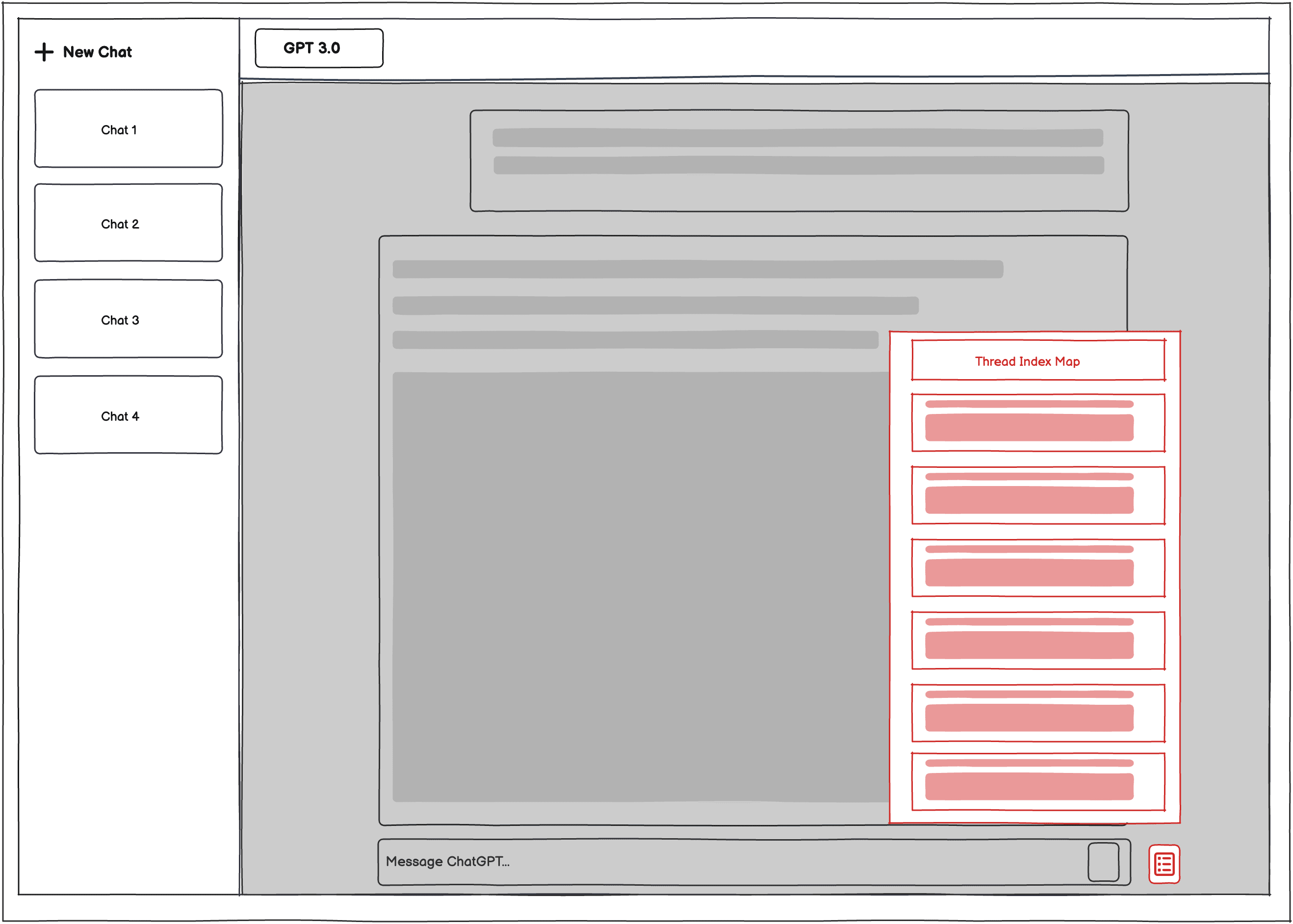
Right Rail (Variant A)
Floating Button (Variant B)
User Flow
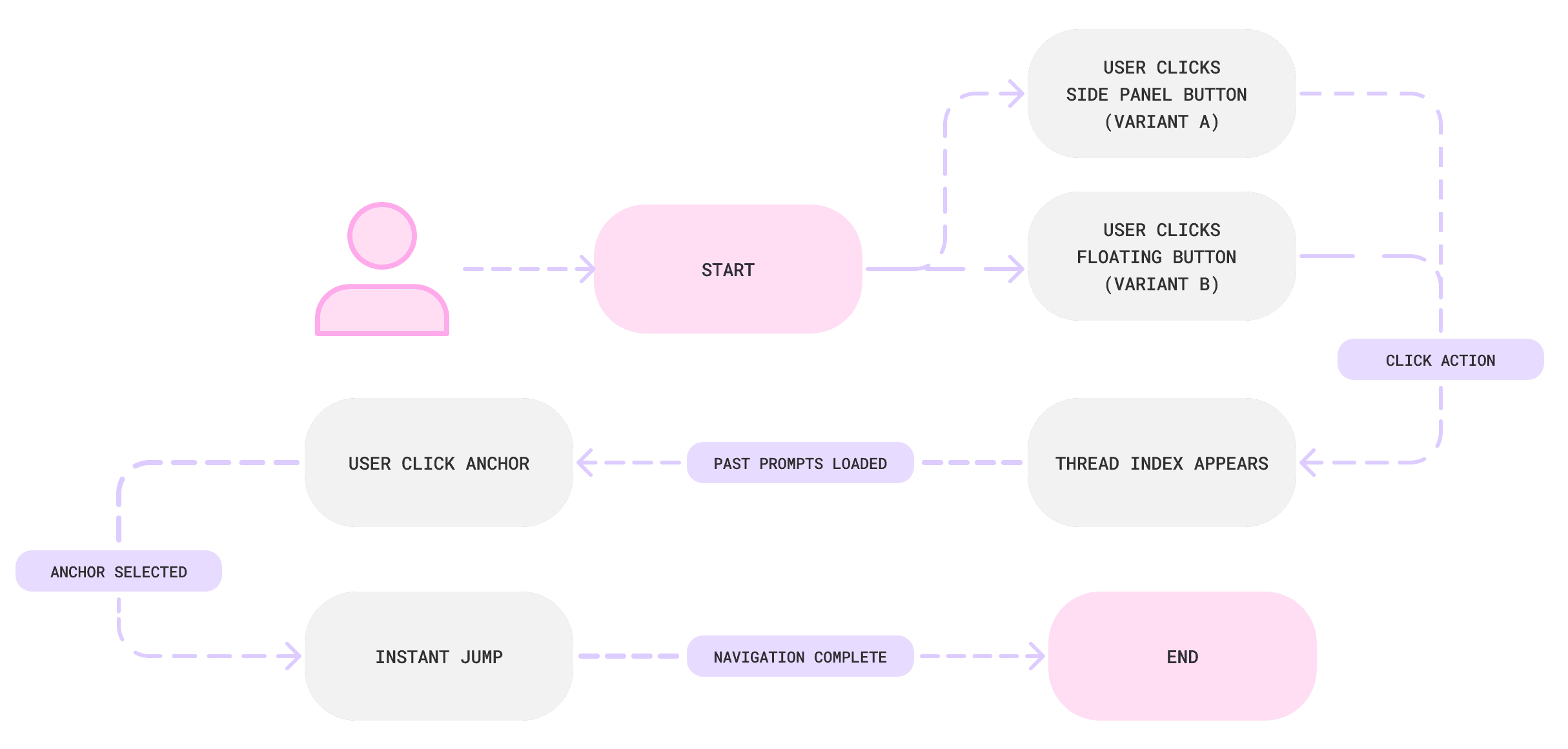
A flowchart showing the trigger logic
A/B Testing & Iteration After Feedback
Through A/B testing, I measured the efficiency of both models based on Hick’s Law (the time it takes to make a decision increases with the number and complexity of choices).
Recognition vs. Recall
Variant A was preferred by users because it utilized recognition over recall and seeing the thread milestones at all times allowed users to navigate instinctively without having to remember where the trigger was hidden.
Cognitive Load
While Variant B was visually cleaner, it increased cognitive load by adding an extra interaction step (hover/click) before the user could even begin their search.
I chose Variant A for the final design. For the high-density workflows of engineers and strategists, a persistent anchor proved superior for retrieval, leading to the 71% faster retrieval speed documented in the final metrics.
Additionally, user feedback highlighted two critical needs for managing long-term threads:
1) Ability to clean up the current conversation to reduce clutter.
2) An option to start a new chat from a specific prompt to pivot their work without losing essential context.
To address this, I integrated editorial controls that allow users to prune messy prompts or branch off into a fresh session from any indexed milestone, ensuring their foundation remains intact while they explore new ideas.
Before User Feedback: No options to delete and start new chat from specific index
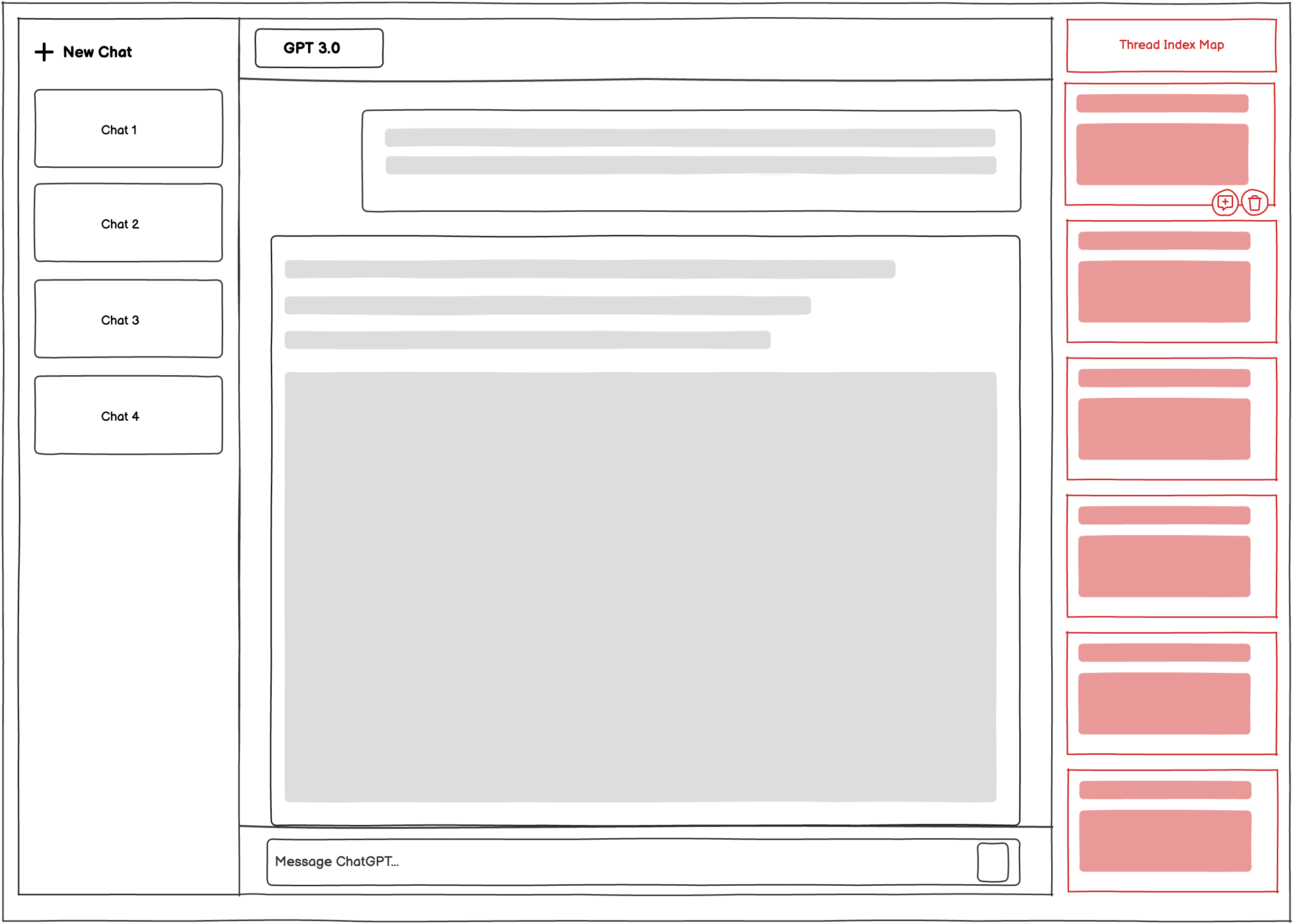
After User Feedback: Delete and Start New Chat from specific index options added
Mobile Optimization
Design Challenge: How might we optimize the chat map for mobile without losing functionality or obscuring the primary conversation?
Solution: To translate the high-density desktop experience to mobile, I tested the two following distinct click-based navigation models.
The goal was to determine which layout provided the fastest access to the Index Map while maintaining the user's sense of place within the chat.
Variant A: Header Toggle (Top-Down Model)
The Interaction
A "List" icon is integrated into the top header bar.
The Result
Clicking the icon triggers a centered popup modal that overlays the middle of the screen.
The Logic
This follows traditional web patterns, keeping the navigation "stored" in the header to ensure the chat input remains completely unobstructed.
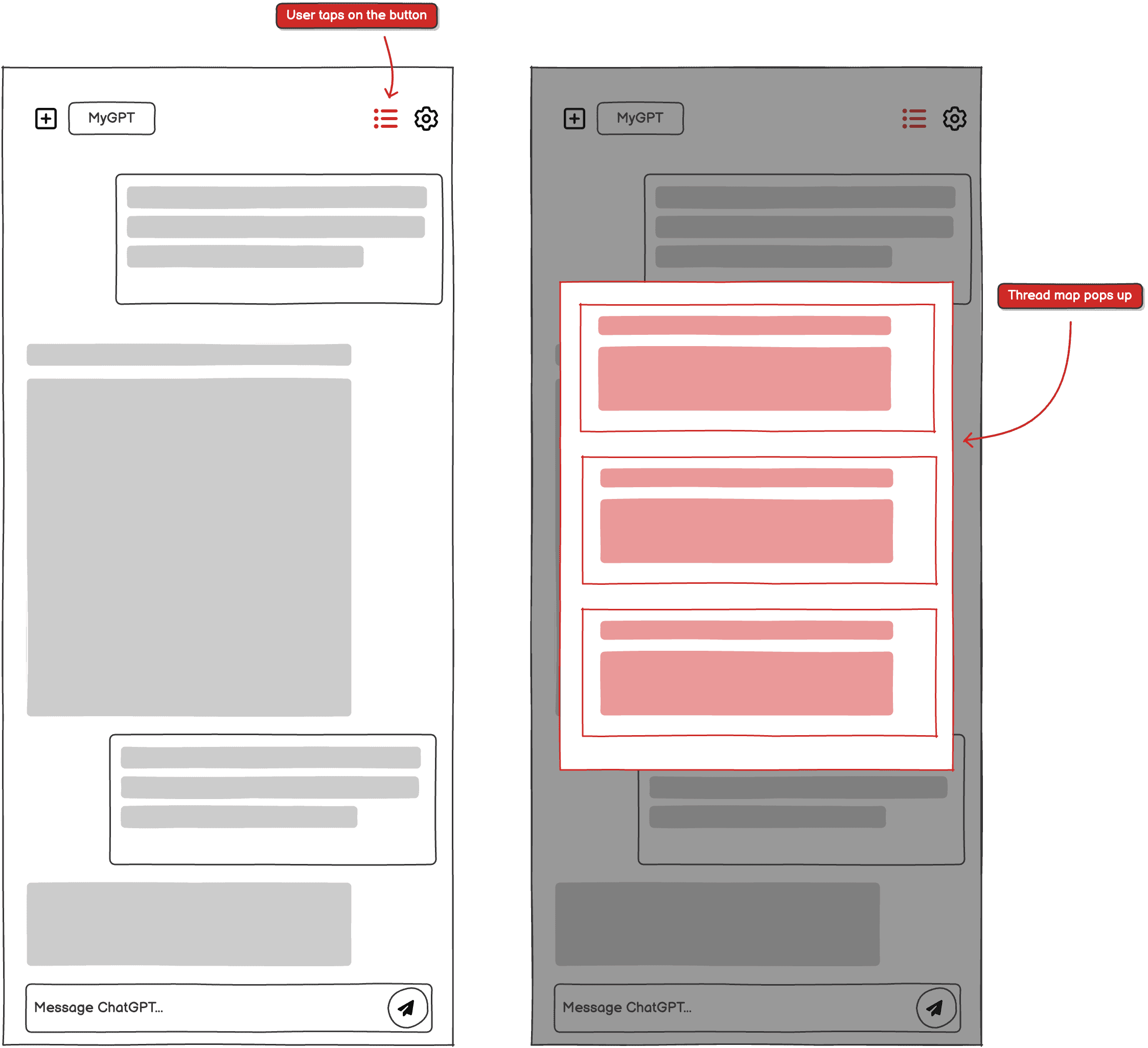
Variant A (Low-Fidelity): Header Toggle shows the centered popup
Variant B: Floating Action Button (Bottom-Up Model)
The Interaction
A persistent Floating Action Button (FAB) sits in the bottom-right corner.
The Result
Clicking the button triggers a Bottom Sheet that slides up from the base of the screen to cover 50% of the viewport.
The Logic
This prioritizes the "Thumb Zone" (the most accessible area of a smartphone), allowing for one-handed operation without shifting the device in the hand.
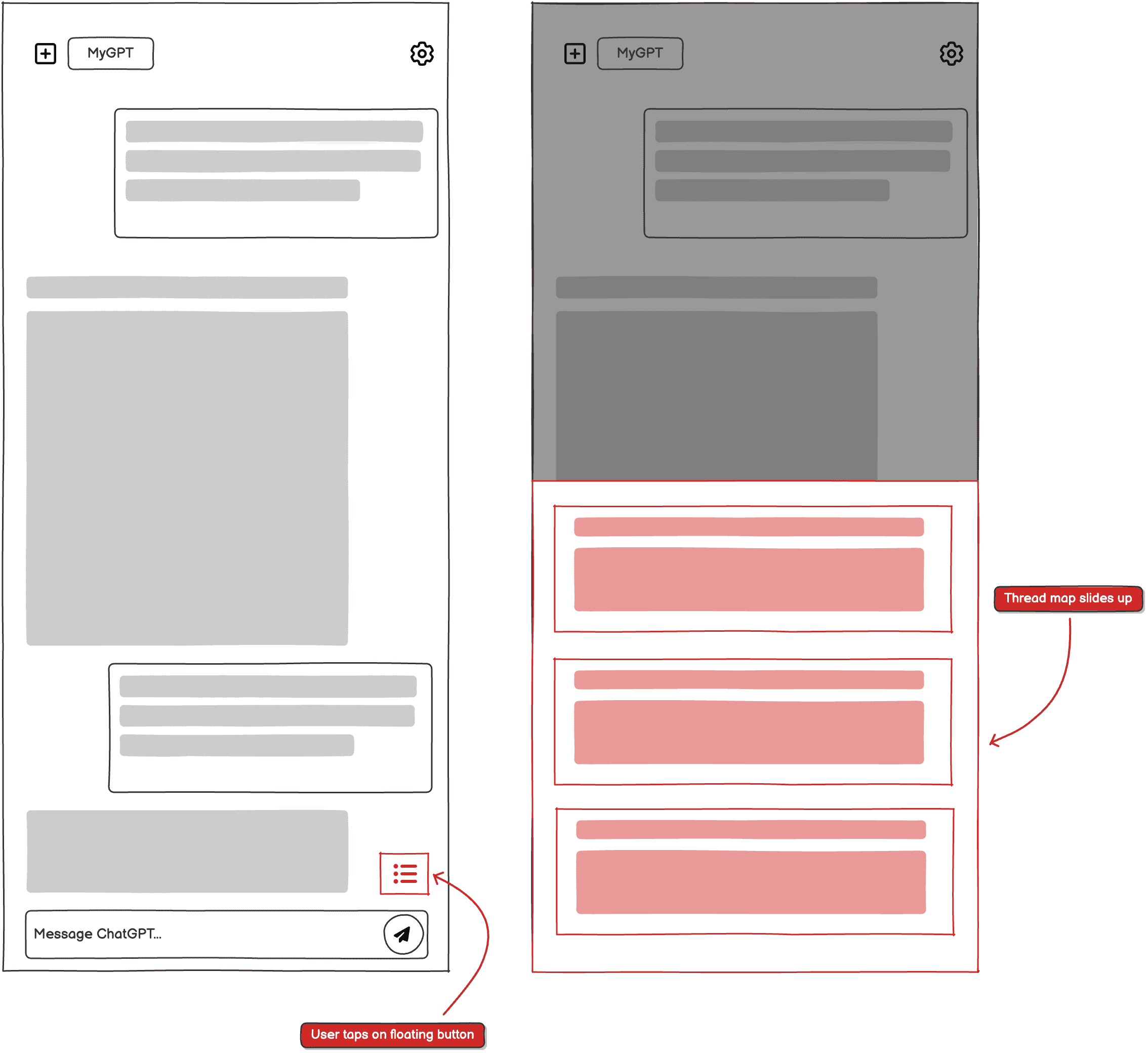
Variant B (Low-Fidelity): Floating Button shows the bottom sheet partially covering the chat to demonstrate reachability.
Key Performance Comparison
Through A/B testing, I measured the efficiency of both models based on the Fitts's Law principle (the time to acquire a target is a function of the distance to and size of the target).
Reachability
Variant B was preferred by 85% of users because the trigger was closer to the thumb's natural resting position.
Context Preservation
Variant A's centered popup felt disruptive, whereas Variant B's bottom sheet allowed users to still see the top of their chat, maintaining better spatial awareness.
I chose Variant B for the final design, as it significantly reduced the physical "travel distance" for the user's thumb during high-frequency retrieval tasks.
Low-Fidelity
Desktop
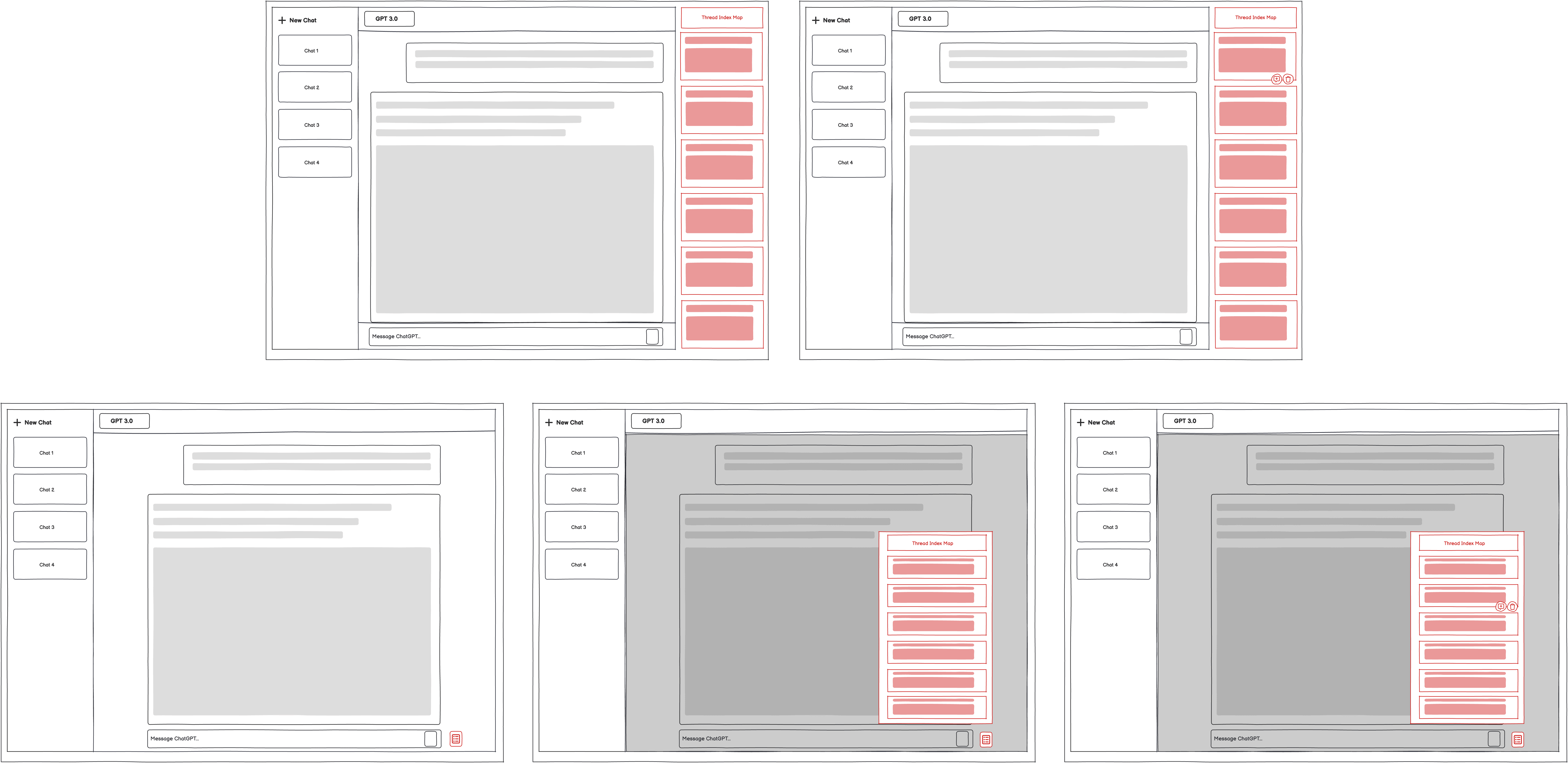
Low fidelity desktop designs: Variant A (Top) and Variant B (Bottom)
Mobile
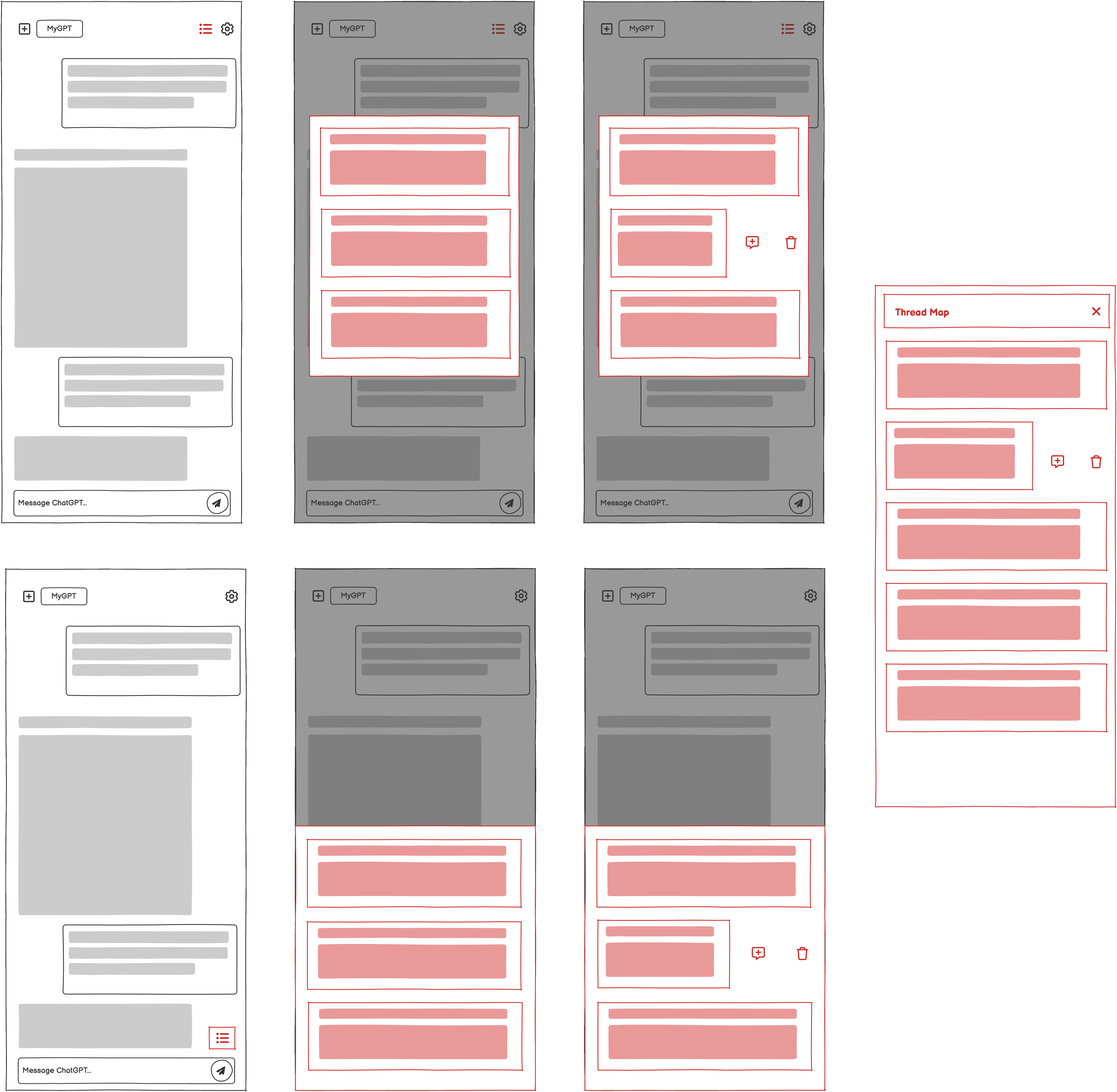
Low fidelity mobile designs: Variant A (Top), Variant B (Bottom) and Full Screen View of Thread Map (Right)
Hi-Fidelity
DESKTOP SCREEN 1: The Right-Panel Icon
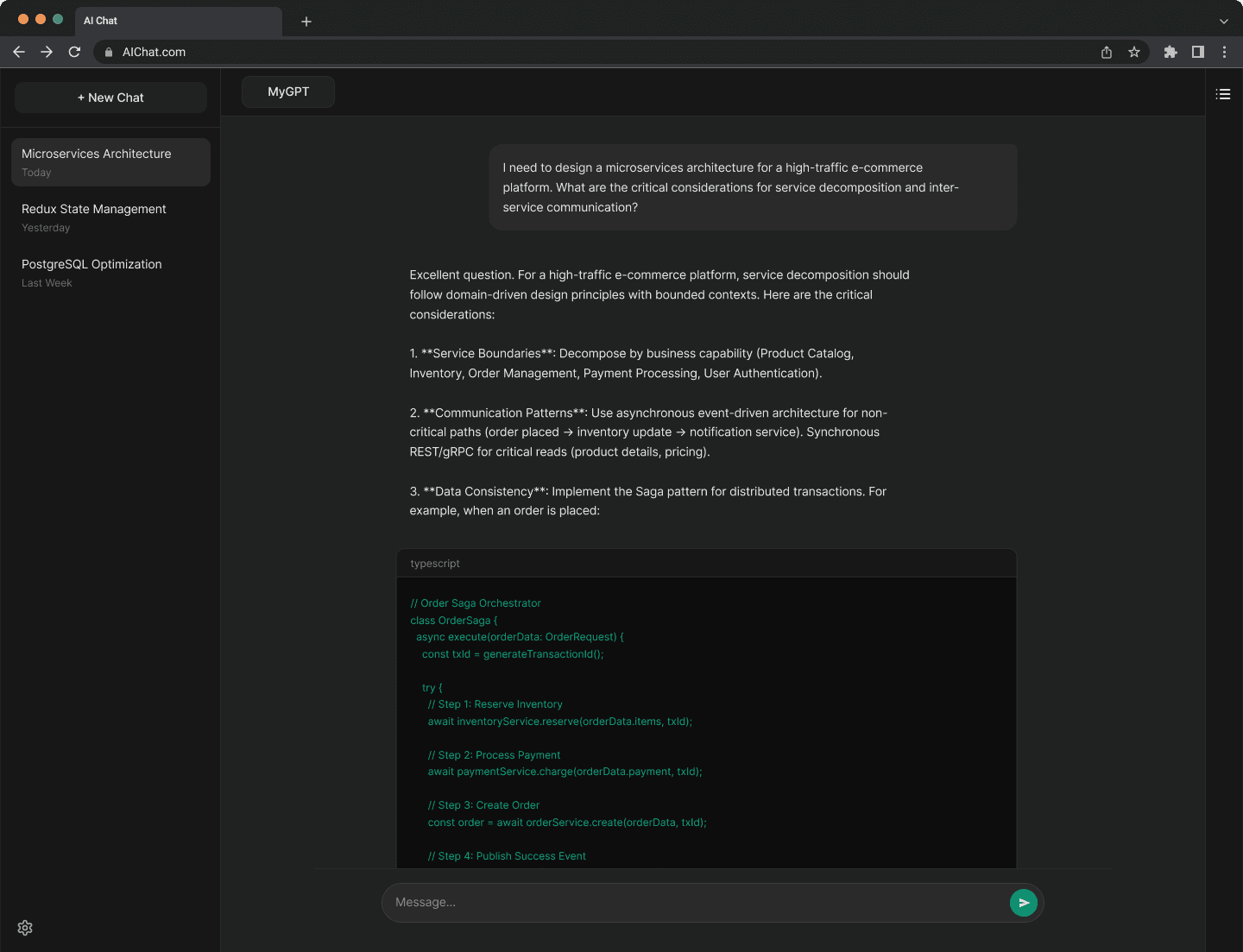
DESKTOP SCREEN 2: The Thread map Index
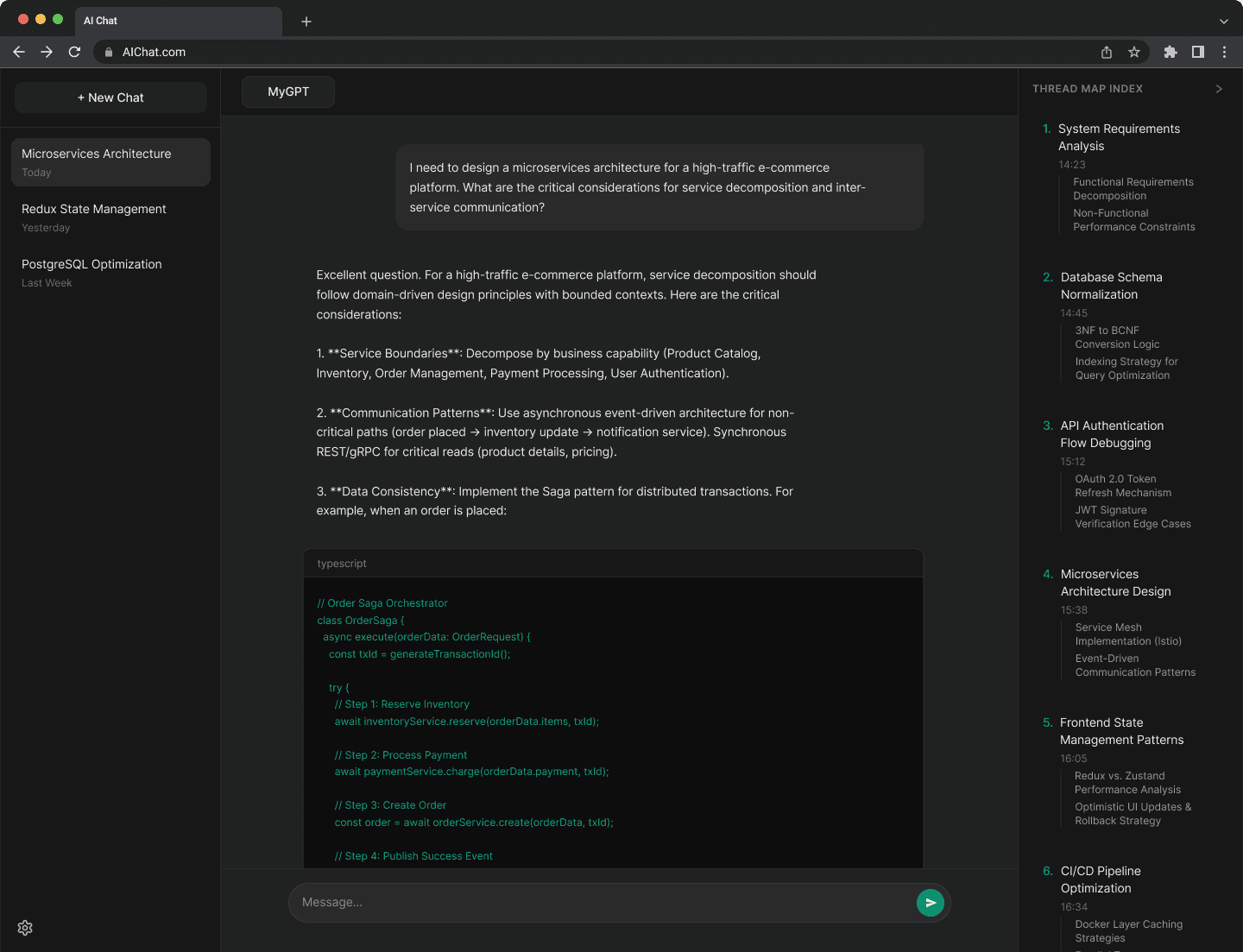
DESKTOP SCREEN 3: INDEX SELECTION
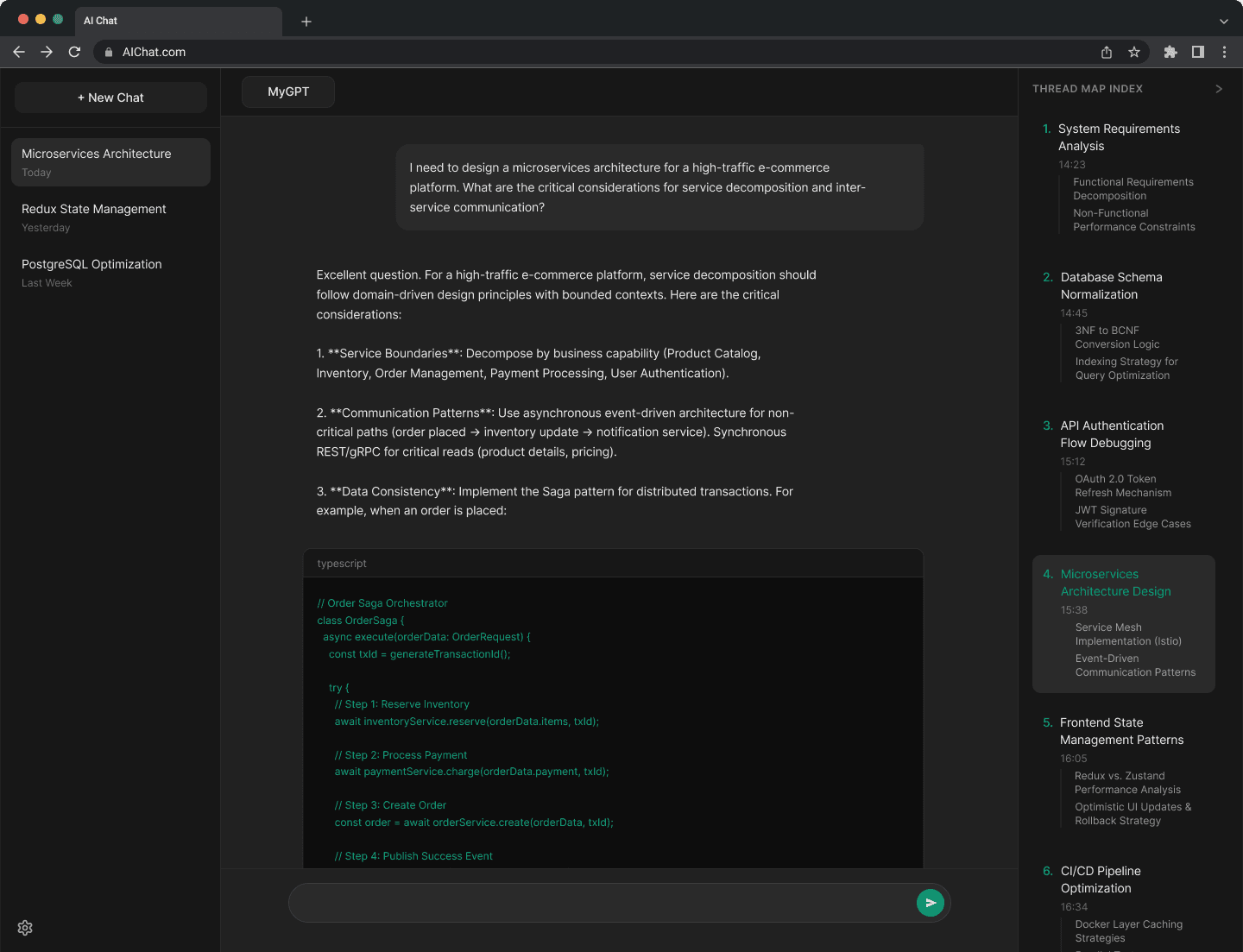
DESKTOP SCREEN 4: chat with selected index & Delete Options
DESKTOP SCREEN 1: The Right-Panel Icon
DESKTOP SCREEN 2: The Thread map Index
DESKTOP SCREEN 3: INDEX SELECTION
DESKTOP SCREEN 4: chat with selected index & Delete Options
DESKTOP SCREEN 1: The Right-Panel Icon
DESKTOP SCREEN 2: The Thread map Index
DESKTOP SCREEN 3: INDEX SELECTION
DESKTOP SCREEN 4: chat with selected index & Delete Options
DESKTOP SCREEN 1: The Right-Panel Icon
DESKTOP SCREEN 2: The Thread map Index
DESKTOP SCREEN 3: INDEX SELECTION
DESKTOP SCREEN 4: chat with selected index & Delete Options
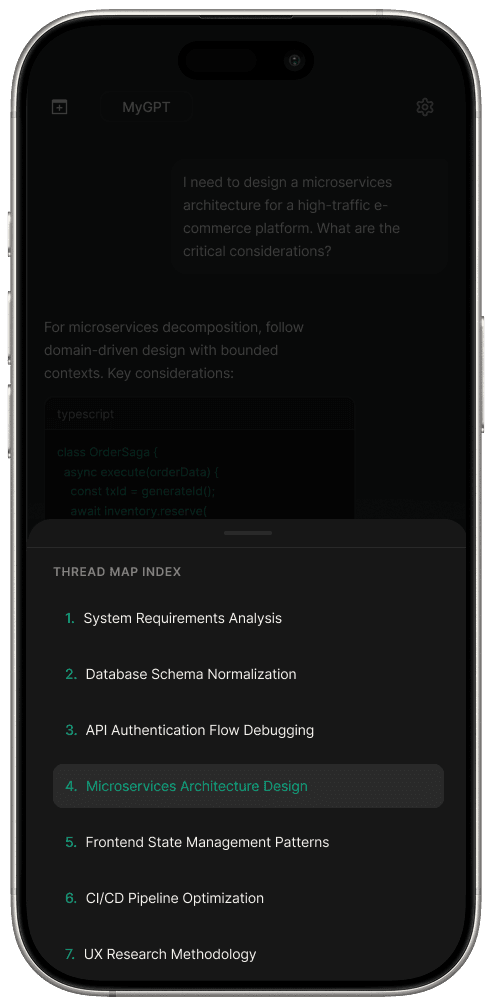
Mobile SCREEN 1: The FloatinG Button
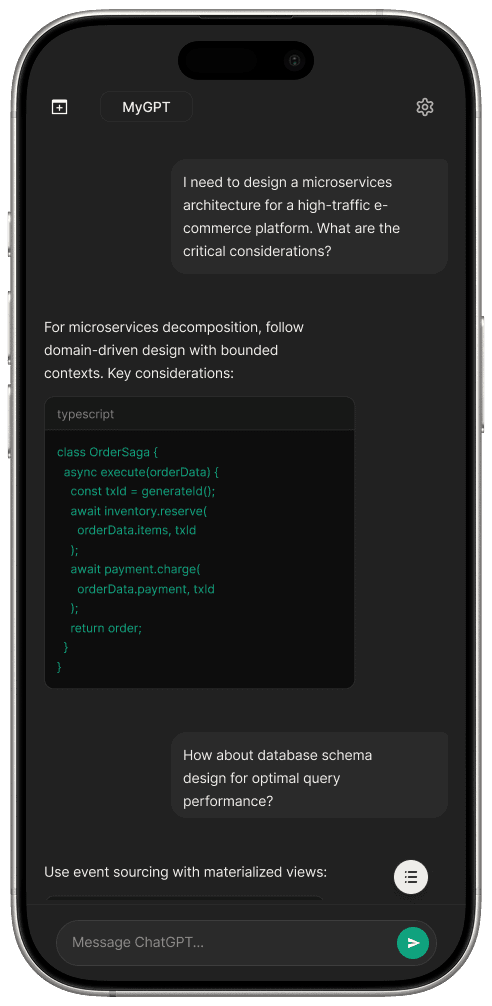
Mobile SCREEN 2: The Thread Map Index
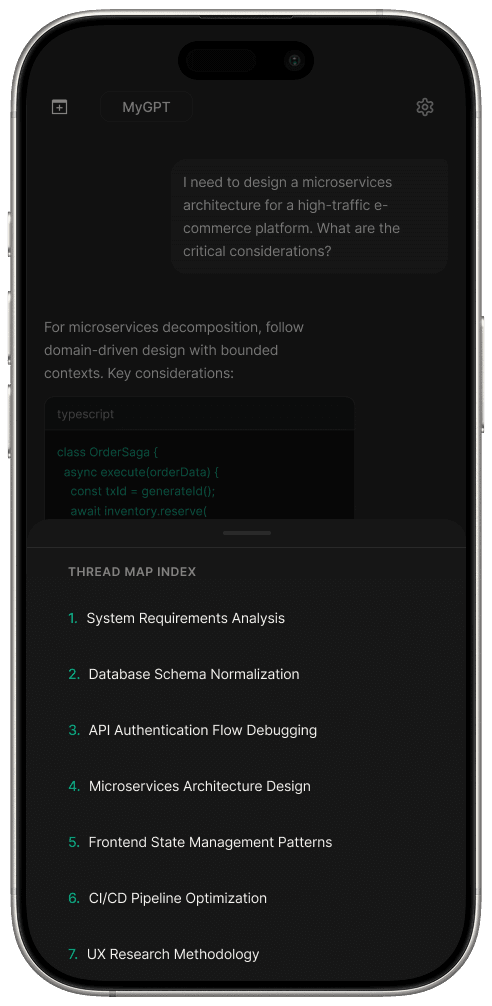
Mobile SCREEN 3: Index Selection
Mobile SCREEN 4: chat with selected index & Delete Options
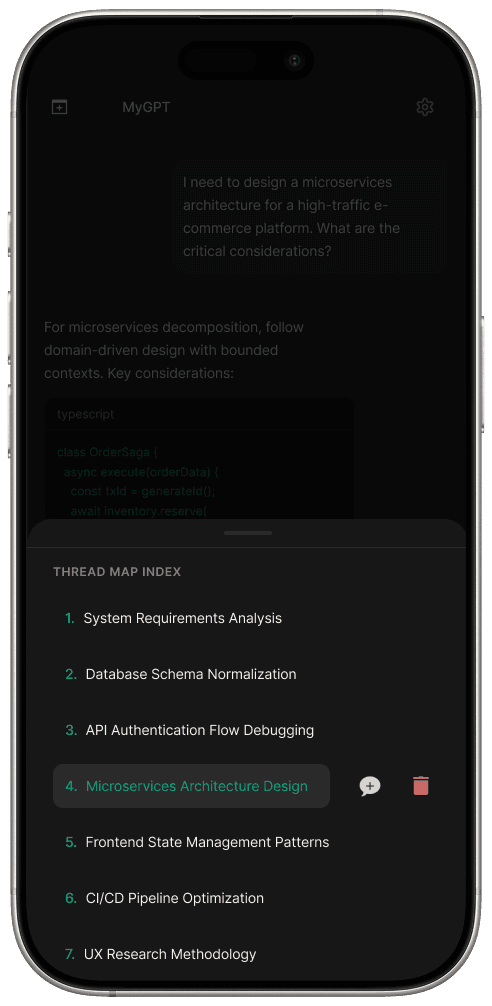
Mobile SCREEN 1: The FloatinG Button
Mobile SCREEN 2: The Thread Map Index
Mobile SCREEN 3: Index Selection
Mobile SCREEN 4: chat with selected index & Delete Options
Mobile SCREEN 1: The FloatinG Button
Mobile SCREEN 2: The Thread Map Index
Mobile SCREEN 3: Index Selection
Mobile SCREEN 4: chat with selected index & Delete Options
Mobile SCREEN 1: The FloatinG Button
Mobile SCREEN 2: The Thread Map Index
Mobile SCREEN 3: Index Selection
Mobile SCREEN 4: chat with selected index & Delete Options
Impact & Results
How metrics were captured
Baseline Benchmarking
Participants were first tasked with retrieving specific data points such as, "Find the API key discussed 40 prompts ago" within the standard, unorganized ChatGPT UI to establish a performance floor.
Quantitative Testing
I utilized Maze to track the Direct Success and Retrieval Speed for the same retrieval missions using the Thread Map prototypes.
Nasa Task Load Index
Following the tasks, participants completed a NASA-TLX assessment to measure subjective workload. This allowed for the quantification of mental demand, effort, and frustration
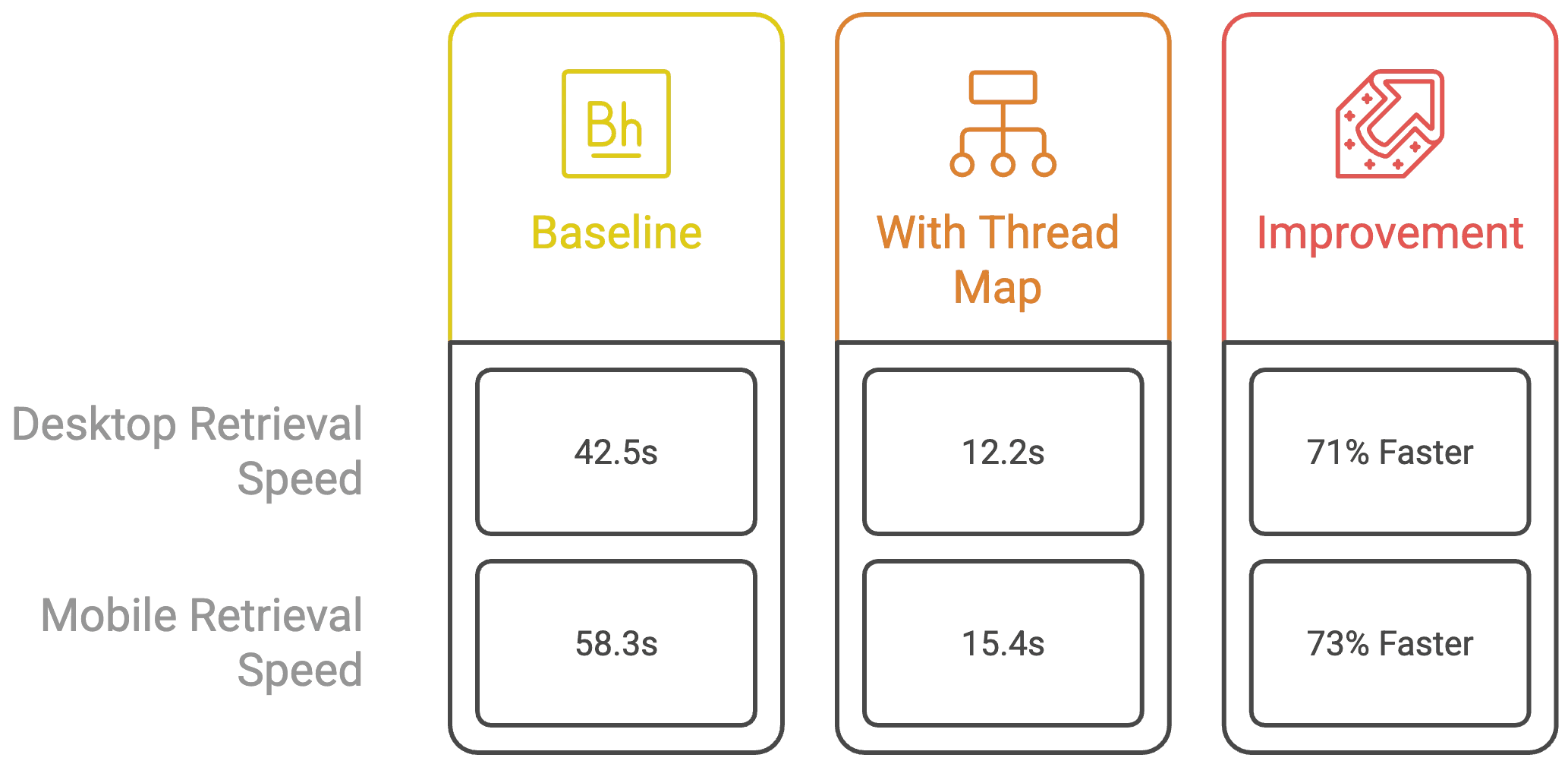
Data chart showing retrieval speed metrics for both desktop and mobile
71%
Improvement in Retrieval Speed
30%
Reduction in Chat Abandonment Rate
45%
Reduction in cognitive load
Moving from 42.5s to 12.2s proves that the Information Architecture (IA) successfully provided a shortcut to the data.
In the baseline, 38% of users got frustrated and started a new chat. Dropping this to 8% was a massive win for Context Retention.
The Thread Map Index achieved a 45% reduction in mental effort, as validated by the NASA Task Load Index.
Key Learnings
Systems Over Styles
My Master’s in Information Systems taught me that the best UX is often a data-retrieval solution disguised as a UI update.
The Complexity Paradox
Power users don't want simple UI, they want powerful UI that hides its complexity until needed (Progressive Disclosure).
The Link Feature & Context Pruning
Users will be able to click an anchor in the Thread Map to pin that past prompt as the primary context for the next AI response
The Goal
Eliminating Context Drift by allowing users to explicitly choose what previous data points the AI should prioritize.
Next Steps
Conclusion
The ChatGPT Thread Map Project proves that structured Information Architecture is the key to scaling AI productivity. By reducing retrieval time by 71%, this project successfully transformed a chaotic brain dump into a professional grade workspace. It validates that for power users, the future of AI isn't just better models, it’s smarter, navigable interfaces that protect user flow and manage high-density data.
Problem
Problem
The "Scroll of Death"
In threads exceeding 25+ messages, users experience a 40% increase in cognitive load. The lack of a hierarchical index forces power users to manually scroll to find past responses, requirements, or logic, leading to "Search Fatigue" and broken "State of Flow."
The "Scroll of Death"
In threads exceeding 25+ messages, users experience a 40% increase in cognitive load. The lack of a hierarchical index forces power users to manually scroll to find past responses, requirements, or logic, leading to "Search Fatigue" and broken "State of Flow."
Project description
As AI conversations scale from simple Q&A to long-form collaborative projects, current linear "chat" interfaces fail to support efficient data navigation. This project introduces a non-linear navigation system, the Thread Map, designed to transform chaotic "infinite scrolls" into structured, navigable workspaces.
Process
This category details the step-by-step approach taken during the project, including research, planning, design, development, testing, and optimization phases.
I utilized an expanded Double Diamond methodology, integrating Human-Computer Interaction (HCI) principles to ensure the solution was both technically feasible and user-centric.
Discover: System Exploration
Research & Benchmarking: Audited how high-density technical tools (VS Code, Notion) handle information hierarchy and deep-linking.
Quantitative Surveying: Distributed a structured survey to 50 active AI users to identify baseline pain points and Context Drift frequency.
Stakeholder Analysis: Identified the needs of "Power Users" versus "Casual Users" to prioritize feature scalability.
Define: Information Architecture & Modeling
Thematic Synthesis: Used Affinity Mapping in Miro to group qualitative interview data into core pillars (e.g., "Keyword Amnesia," "Interaction Fatigue").
Information Architecture (IA) Mapping: Developed a structural taxonomy to determine how raw chat tokens would be categorized into AI-summarized headers.
Persona & Journey Modeling: Constructed the "Alex" and "Sarah" personas and mapped the Cognitive Friction points in a standard 2 hour coding session.
Develop: Iterative Prototyping
Low-Fidelity Ideation: Conducted rapid low-fidelity prototyping sessions in Balsamiq to explore non-intrusive navigation patterns (Sidebars vs. Overlays).
A/B Test Design: Defined the parameters for two distinct UI variants to test "Persistent Navigation" vs. "Progressive Disclosure."
Deliver: Validation & Performance Analysis
High-Fidelity Prototyping: Built a fully interactive, platform-agnostic prototype featuring variants for A/B Testing.
Usability Testing: Ran moderated sessions to collect Performance Metrics (Retrieval Speed, Cognitive Load).
Heuristic Evaluation & Refinement: Conducted a final pass to ensure the design met accessibility standards and minimized the NASA-TLX cognitive workload scores.
Research & Insights
User Survey
Conducted an unmoderated survey of 50 active AI users via LinkedIn and through University of Maryland
82%
Reported frustration with scrolling in threads over 20 messages.
65%
Started new chats just to avoid the UI mess, losing valuable project context.
82%
Reported frustration with scrolling in threads over 20 messages.
65%
Started new chats just to avoid the UI mess, losing valuable project context.
Sample Research Questions
Survey Questions (Quantitative)
1) "How often do you use AI Chat Systems for tasks requiring more than 20 prompts in a single session?" (Likert Scale)
2) "On a scale of 1 to 5, how difficult is it to locate a specific piece of information from earlier in a long conversation?"
3) "Which method do you currently use to find past data? (Scrolling, Browser Search, Starting a new chat, copy-pasting to other apps)"
4) "Have you ever abandoned a chat because it became too difficult to navigate?"
Interview Questions (Qualitative)
1) "When reviewing work or complex AI outputs, how does the current linear layout affect your ability to verify specific technical milestones?"
2) "Can you walk me through your survival strategy'for managing a massive chat thread during a project?"
3) "If this chat had a Table of Contents, which specific elements (code blocks, definitions, summaries) would be most important for you to see at a glance?"
4) "Can you describe the exact point where you feel lost in a conversation?"
Key Insights
Keyword Amnesia
Users remember the context (e.g., when we fixed the bug) but not the specific syntax, making browser "Find" (Cmd+F) ineffective.
Visual Monotony
The repetitive look of chat bubbles makes it hard to distinguish sections of a conversation.
A screenshot of a Miro board with clusters of colorful sticky notes grouped by themes like "Navigational Friction," "Cognitive Load," "Visual Landmark Needs" and "Failed Workarounds."
Empathy Map
Empathy Map
A quadrant diagram showing what users Say, Think, Do, and Feel during long chat sessions.
A quadrant diagram showing what users Say, Think, Do, and Feel during long chat sessions.
Personas
Personas
Information Architecture
Information Architecture
Moving AI Chat System from a "Casual Chat" mental model to a "Relational Knowledge Base."
Moving AI Chat System from a "Casual Chat" mental model to a "Relational Knowledge Base."
A logic tree showing the system pipeline: Raw Data Input -> AI Summarization Layer
-> Navigation UI Output.
Ideation & Execution
Ideation & Execution
Explored two ways to display the map: Right Rail and Floating Button
Explored two ways to display the map: Right Rail and Floating Button
User Flow
A flowchart showing the trigger logic
Right Rail (Variant A)
Floating Button (Variant B)
A/B Testing & Iteration After Feedback
Through A/B testing, I measured the efficiency of both models based on Hick’s Law (the time it takes to make a decision increases with the number and complexity of choices).
Through A/B testing, I measured the efficiency of both models based on Hick’s Law (the time it takes to make a decision increases with the number and complexity of choices).
Recognition vs. Recall
Variant A was preferred by users because it utilized recognition over recall and seeing the thread milestones at all times allowed users to navigate instinctively without having to remember where the trigger was hidden.
Cognitive Load
While Variant B was visually cleaner, it increased cognitive load by adding an extra interaction step (hover/click) before the user could even begin their search.
I chose Variant A for the final design. For the high-density workflows of engineers and strategists, a persistent anchor proved superior for retrieval, leading to the 71% faster retrieval speed documented in the final metrics.
Additionally, user feedback highlighted two critical needs for managing long-term threads:
1) Ability to clean up the current conversation to reduce clutter.
2) An option to start a new chat from a specific prompt to pivot their work without losing essential context.
To address this, I integrated editorial controls that allow users to prune messy prompts or branch off into a fresh session from any indexed milestone, ensuring their foundation remains intact while they explore new ideas.
Before User Feedback: No options to delete and start new chat from specific index
After User Feedback: Delete and Start New Chat from specific index options added
Mobile Optimization
Mobile Optimization
Design Challenge: How might we optimize the chat map for mobile without losing functionality or obscuring the primary conversation?
Design Challenge: How might we optimize the chat map for mobile without losing functionality or obscuring the primary conversation?
Solution: To translate the high-density desktop experience to mobile, I tested the two following distinct click-based navigation models.
The goal was to determine which layout provided the fastest access to the Index Map while maintaining the user's sense of place within the chat.
Variant A: Header Toggle (Top-Down Model)
Variant A: Header Toggle (Top-Down Model)
The Interaction
Mobile Optimization
Design Challenge: How might we optimize the chat map for mobile without losing functionality or obscuring the primary conversation?
Solution: To translate the high-density desktop experience to mobile, I tested the two following distinct click-based navigation models.
The goal was to determine which layout provided the fastest access to the Index Map while maintaining the user's sense of place within the chat.
Variant A: Header Toggle (Top-Down Model)
The Interaction
A "List" icon is integrated into the top header bar.
The Result
Clicking the icon triggers a centered popup modal that overlays the middle of the screen.
The Logic
This follows traditional web patterns, keeping the navigation "stored" in the header to ensure the chat input remains completely unobstructed.
Variant A (Low-Fidelity): Header Toggle shows the centered popup
Variant B: Floating Action Button (Bottom-Up Model)
The Interaction
A persistent Floating Action Button (FAB) sits in the bottom-right corner.
The Result
Clicking the button triggers a Bottom Sheet that slides up from the base of the screen to cover 50% of the viewport.
The Logic
This prioritizes the "Thumb Zone" (the most accessible area of a smartphone), allowing for one-handed operation without shifting the device in the hand.
Variant B (Low-Fidelity): Floating Button shows the bottom sheet partially covering the chat to demonstrate reachability.
Key Performance Comparison
Through A/B testing, I measured the efficiency of both models based on the Fitts's Law principle (the time to acquire a target is a function of the distance to and size of the target).
Reachability
Variant B was preferred by 85% of users because the trigger was closer to the thumb's natural resting position.
Context Preservation
Variant A's centered popup felt disruptive, whereas Variant B's bottom sheet allowed users to still see the top of their chat, maintaining better spatial awareness.
I chose Variant B for the final design, as it significantly reduced the physical "travel distance" for the user's thumb during high-frequency retrieval tasks.
A "List" icon is integrated into the top header bar.
The Result
Clicking the icon triggers a centered popup modal that overlays the middle of the screen.
The Logic
This follows traditional web patterns, keeping the navigation "stored" in the header to ensure the chat input remains completely unobstructed.
Variant A (Low-Fidelity): Header Toggle shows the centered popup
Variant B: Floating Action Button (Bottom-Up Model)
Variant B: Floating Action Button (Bottom-Up Model)
The Interaction
A persistent Floating Action Button (FAB) sits in the bottom-right corner.
The Result
Clicking the button triggers a Bottom Sheet that slides up from the base of the screen to cover 50% of the viewport.
The Logic
This prioritizes the Thumb Zone (the most accessible area of a smartphone), allowing for one-handed operation without shifting the device in the hand.
Variant B (Low-Fidelity): Floating Button shows the bottom sheet partially covering the chat to demonstrate reachability.
Key Performance Comparison
Through A/B testing, I measured the efficiency of both models based on the Fitts's Law principle (the time to acquire a target is a function of the distance to and size of the target).
Reachability
Variant B was preferred by 85% of users because the trigger was closer to the thumb's natural resting position.
Context Preservation
Variant A's centered popup felt disruptive, whereas Variant B's bottom sheet allowed users to still see the top of their chat, maintaining better spatial awareness.
I chose Variant B for the final design, as it significantly reduced the physical travel distance for the user's thumb during high-frequency retrieval tasks.
Low-Fidelity
Low-Fidelity
Desktop
Low fidelity desktop designs: Variant A (Top) and Variant B (Bottom)
Mobile
Low fidelity mobile designs: Variant A (Top), Variant B (Bottom) and Full Screen View of Thread Map (Right)
Impact & Results
Impact & Results
How metrics were captured
How metrics were captured
Baseline Benchmarking
Participants were first tasked with retrieving specific data points such as, "Find the API key discussed 40 prompts ago" within the standard, unorganized ChatGPT UI to establish a performance floor.
Quantitative Testing
I utilized Maze to track the Direct Success and Retrieval Speed for the same retrieval missions using the Thread Map prototypes.
Nasa Task Load Index
Following the tasks, participants completed a NASA-TLX assessment to measure subjective workload. This allowed for the quantification of mental demand, effort, and frustration
Data chart showing retrieval speed metrics for both desktop and mobile
71%
71%
Improvement in Retrieval Speed
30%
30%
Reduction in Chat Abandonment Rate
45%
45%
Reduction in cognitive load
Based on research showing 30 to 40% behavior change when users receive contextual prompts at critical decision moments.
In the baseline, 38% of users got frustrated and started a new chat. Dropping this to 8% was a massive win for Context Retention.
The Thread Map Index achieved a 45% reduction in mental effort, as validated by the NASA Task Load Index.
Key Learnings
Systems Over Styles
My Master’s in Information Systems taught me that the best UX is often a data-retrieval solution disguised as a UI update.
The Complexity Paradox
Power users don't want simple UI, they want powerful UI that hides its complexity until needed (Progressive Disclosure).
The Link Feature & Context Pruning
Users will be able to click an anchor in the Thread Map to pin that past prompt as the primary context for the next AI response
The Goal
Eliminating Context Drift by allowing users to explicitly choose what previous data points the AI should prioritize.
Next Steps
Conclusion
The ChatGPT Thread Map Project proves that structured Information Architecture is the key to scaling AI productivity. By reducing retrieval time by 71%, this project successfully transformed a chaotic brain dump into a professional grade workspace. It validates that for power users, the future of AI isn't just better models, it’s smarter, navigable interfaces that protect user flow and manage high-density data.
Hi-Fidelity
Hi-Fidelity
DESKTOP SCREEN 1: The Right-Panel Icon
DESKTOP SCREEN 2: The Thread map Index
DESKTOP SCREEN 3: INDEX SELECTION
DESKTOP SCREEN 4: chat with selected index & Delete Options
Mobile SCREEN 1: The FloatinG Button
Mobile SCREEN 2: The Thread Map Index
Mobile SCREEN 3: Index Selection
Mobile SCREEN 4: chat with selected index & Delete Options