AI-POWERED food delivery
A UX/UI concept for a restaurant referral and loyalty app.
Project description
Project description
Dealicious is a mobile-first platform designed to connect users with time-sensitive, localized food and beverage deals. It addresses the gap between diners seeking value and restaurants aiming to fill seats during off-peak hours or promote new menus. The app provides a curated, user-friendly experience for discovering, purchasing, and redeeming discounts at nearby eateries.
Dealicious is a mobile-first platform designed to connect users with time-sensitive, localized food and beverage deals. It addresses the gap between diners seeking value and restaurants aiming to fill seats during off-peak hours or promote new menus. The app provides a curated, user-friendly experience for discovering, purchasing, and redeeming discounts at nearby eateries.
Problem
Consumers want to enjoy dining out and try new restaurants but are often constrained by budget.
Key issues identified:
•
Deals are scattered across too many sources.
•
Users see balances without future context
•
users doubt validity
•
Users are shown irrelevant deals not based on location or preference.
Design Challenge:
How might we improve deals tailored to users at the moment of purchase?
Research & Insights
Research & Insights
Research Methods
Research Methods
Competitive Analysis (Groupon, LivingSocial, Restaurant Apps)
Competitive Analysis (Groupon, LivingSocial, Restaurant Apps)
Online Surveys
Online Surveys
User Surveys & Interviews
User Surveys & Interviews
Usability Testing
Usability Testing
Key Insights
Immediacy matters more than variety
Users decide on deals spontaneously, often within 2 hours of wanting to eat.
Context beats generic listings
Seeing a relevant deal for a nearby restaurant is more compelling than a generic list of coupons.
Transparency builds trust
Clear terms and visible countdown timers
("2h left") eliminate doubt about deal validity.
Frictionless redemption is key
A simple "show-this-screen" process at the restaurant is essential for user satisfaction.
These insights shaped Findo's core intervention-first experience
Personas
Primary Persona: Marketing Associate
Age
28
Profile
A Marketing Associate living in the city, tech-savvy, dines out 3 to 4 times a week, and values both convenience and experience.
Goals
• Get big discounts fast
• Redeem easily
• Try new spots
Pain Points
• Coupon spam
• Expired offers
• Hidden costs
• Bad recommendations
Needs
• Trusted app
• Live deal updates
• Clear rules
Secondary Persona: Business Owner
Age
45
Profile
A small business owner that often hosts client lunches and team dinners. Values reliability and a polished experience over deep discounts. Budget-conscious but prioritizes time and professional impression.
Goals
• Find reliable restaurants for business
meals
• Book tables easily & manage
reservations in advance
• Access special offers for group dining
or set menus
Pain Points
• Overthinks every purchase decision
• Struggles with fluctuating income
• Constantly checks account balances
Needs
• A clear indicator of restaurant
ambiance
• Direct integration with reservation
systems
• Deals structured for groups
User Feedback (Concept Testing)
Alex, 28
Marketing Associate
“It helps me find better deals and clearly explains why a particular option saves me more money.”
Jordan, 45
Business Owner
“This has been really helpful when hosting client meetings. It feels reliable and polished, which matters more to me than finding the deepest discount.”
Low-Fidelity Wireframes
Low-Fidelity Wireframes
Hi-Fidelity Wireframes
Hi-Fidelity Wireframes
Splash screen
What users see as they open the app.
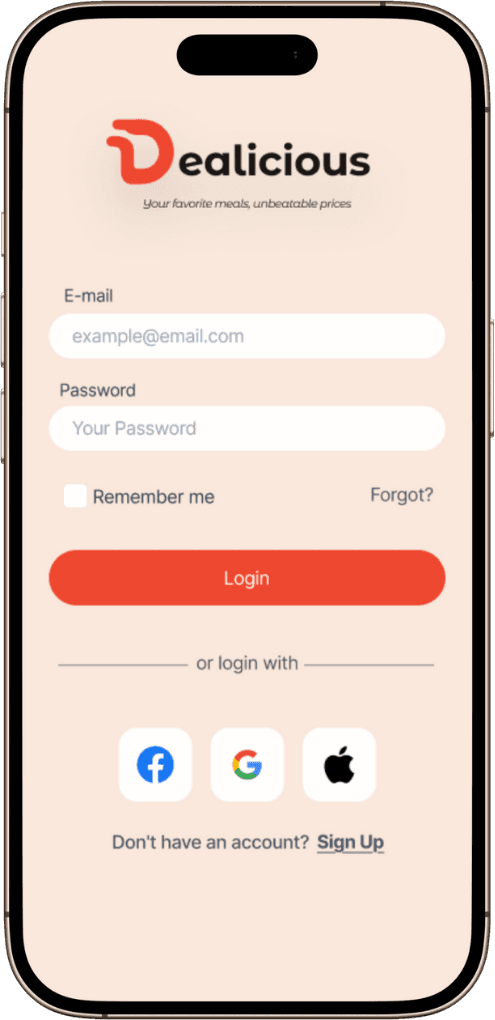
log in / sign up
View your deals when logged in or sign up using email, Facebook, Gmail, or Apple to view deals nearby
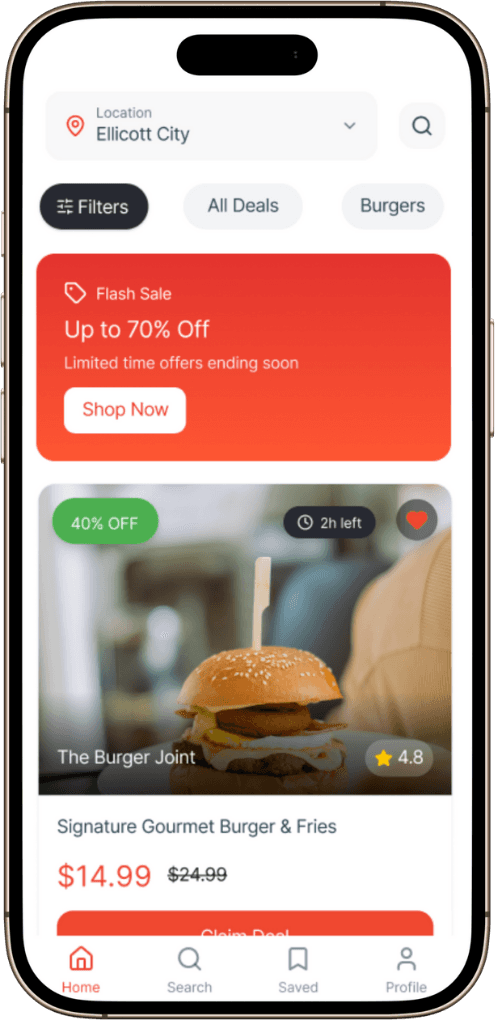
home screen
See how many deals are available and explore using features like location and preferences.
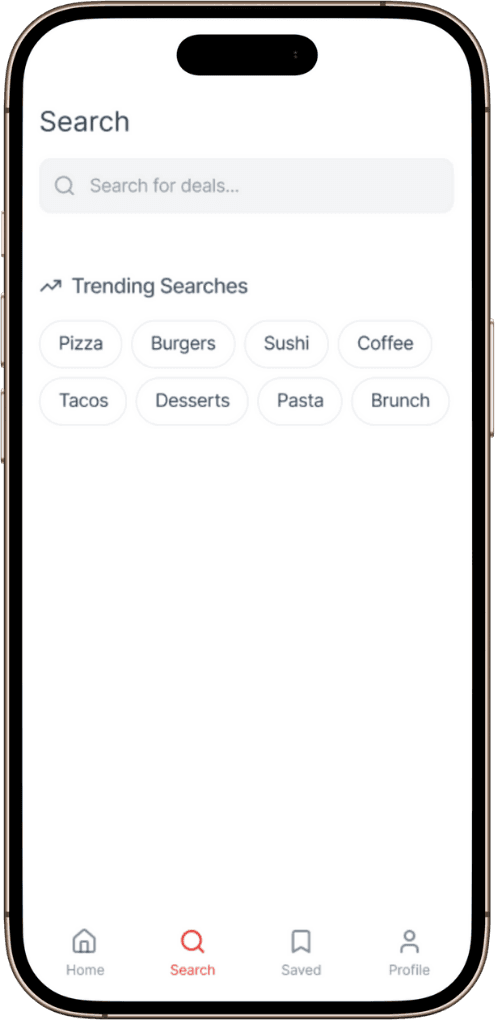
search screen
Search for deals based on favorite restaurants, foods, and see what is trending to get some guidance on next redemptions.
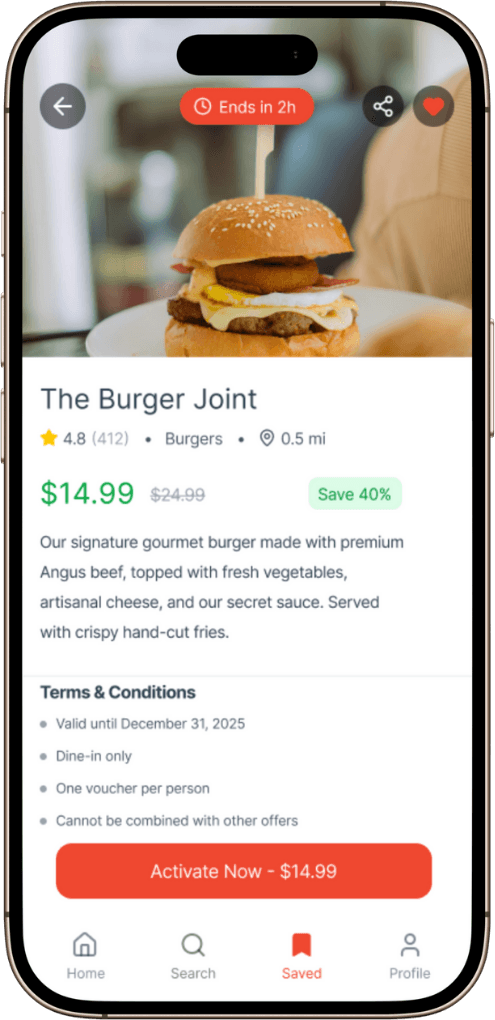
Saved deals
See how many saved deals you have, so you can check them out in future.
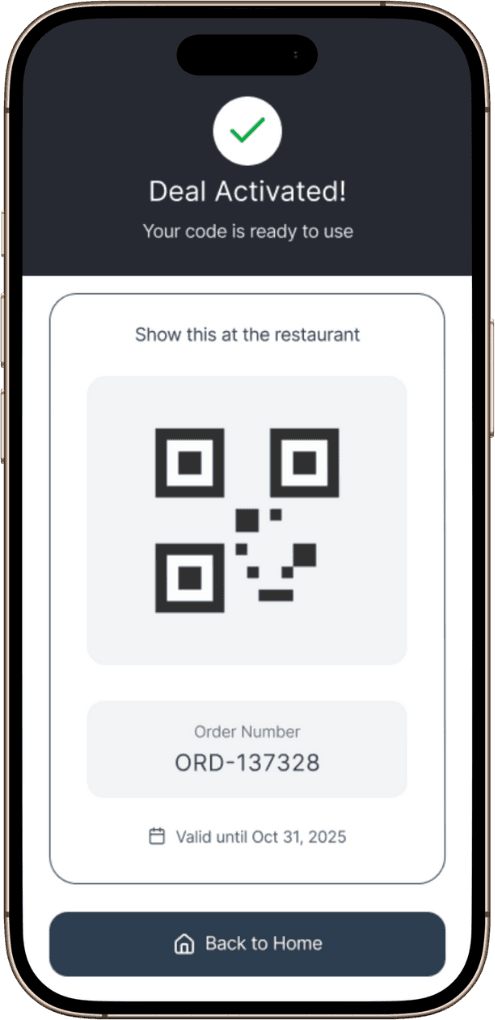
Activation
After activation, you get a QR code along with the order number to use at the restaurant.
your profile
See your account details along with settings to update your profile. It also shows order history, notification settings, and help.
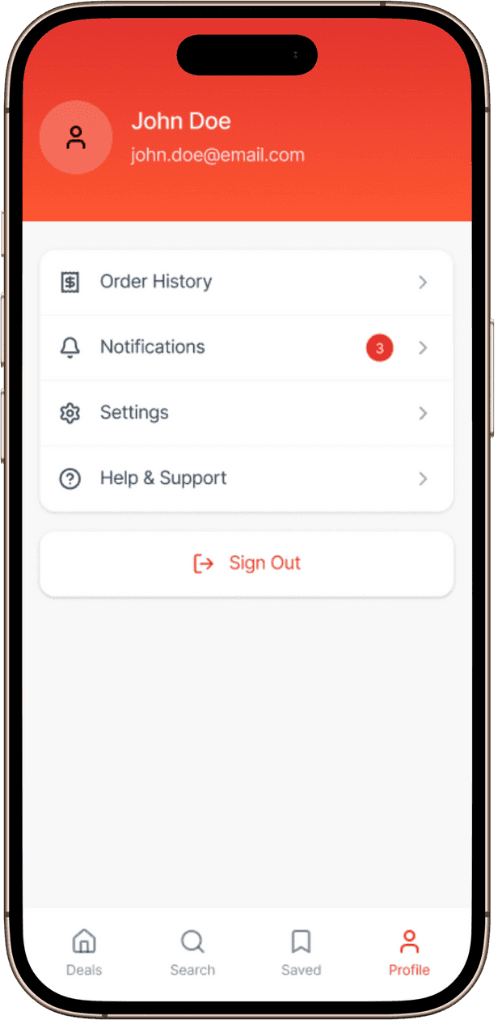
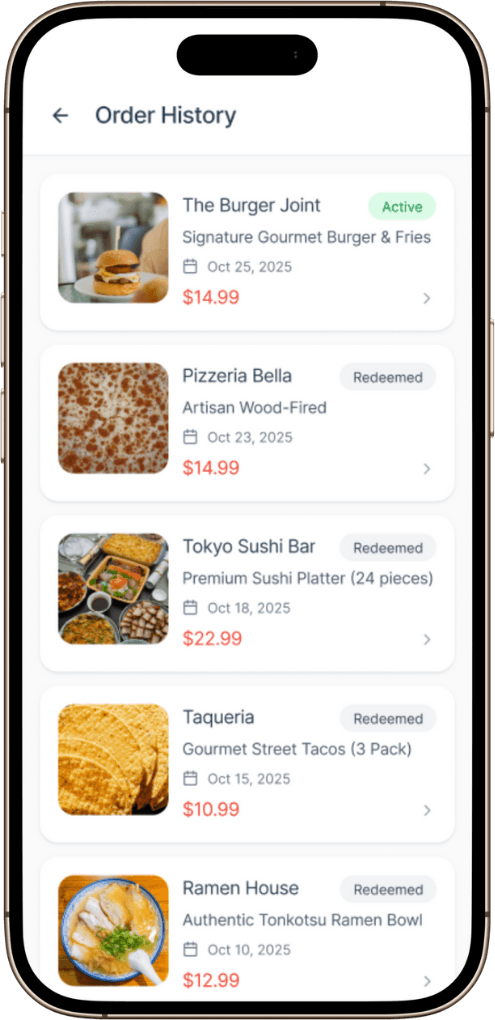
order history
View your order history, including previous purchases and redemptions.
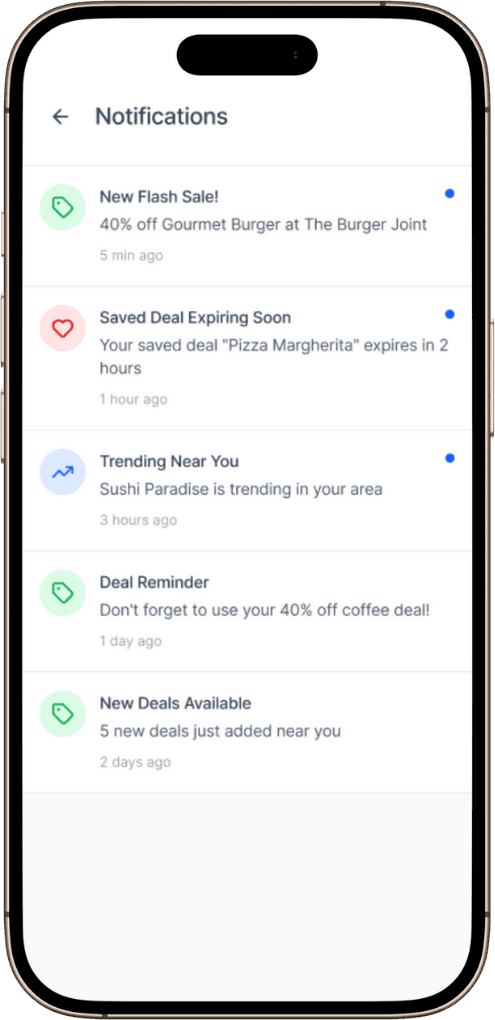
notifications
Toggle any notification preferances to view deals as soon as they drop.
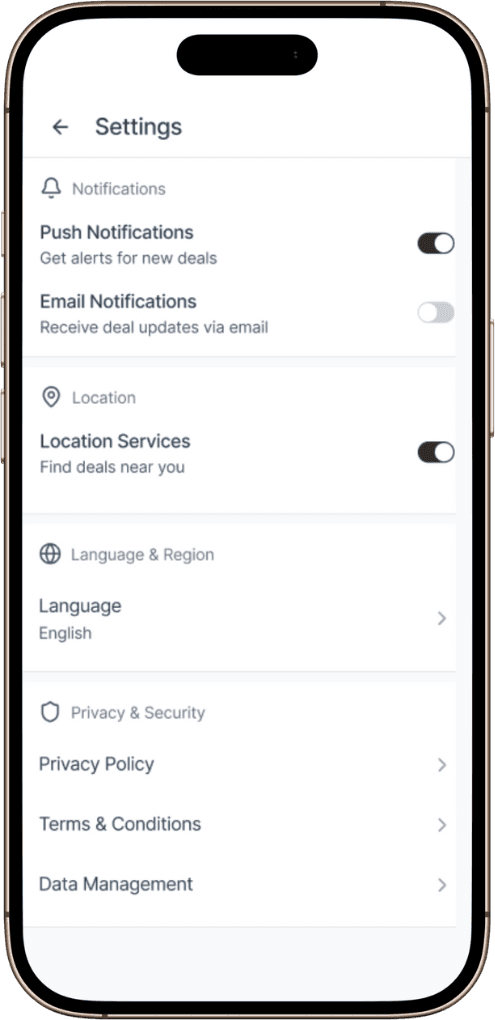
settings
Use interactive widgets to update personal information, such as location, email, etc.
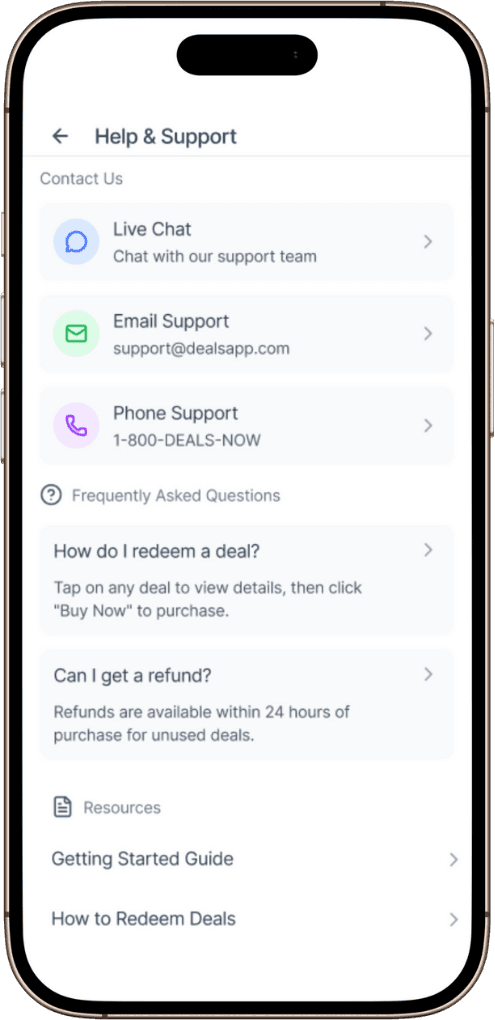
help & support
Get help and support on any redemption by calling, chatting, or submitting a ticket via email.
Splash screen
What users see as they open the app.
log in / sign up
View your deals when logged in or sign up using email, Facebook, Gmail, or Apple to view deals nearby
home screen
See how many deals are available and explore using features like location and preferences.
search screen
Search for deals based on favorite restaurants, foods, and see what is trending to get some guidance on next redemptions.
Saved deals
See how many saved deals you have, so you can check them out in future.
Activation
After activation, you get a QR code along with the order number to use at the restaurant.
your profile
See your account details along with settings to update your profile. It also shows order history, notification settings, and help.
order history
View your order history, including previous purchases and redemptions.
notifications
Toggle any notification preferances to view deals as soon as they drop.
settings
Use interactive widgets to update personal information, such as location, email, etc.
help & support
Get help and support on any redemption by calling, chatting, or submitting a ticket via email.
Splash screen
What users see as they open the app.
log in / sign up
View your deals when logged in or sign up using email, Facebook, Gmail, or Apple to view deals nearby
home screen
See how many deals are available and explore using features like location and preferences.
search screen
Search for deals based on favorite restaurants, foods, and see what is trending to get some guidance on next redemptions.
Saved deals
See how many saved deals you have, so you can check them out in future.
Activation
After activation, you get a QR code along with the order number to use at the restaurant.
your profile
See your account details along with settings to update your profile. It also shows order history, notification settings, and help.
order history
View your order history, including previous purchases and redemptions.
notifications
Toggle any notification preferances to view deals as soon as they drop.
settings
Use interactive widgets to update personal information, such as location, email, etc.
help & support
Get help and support on any redemption by calling, chatting, or submitting a ticket via email.
Splash screen
What users see as they open the app.
log in / sign up
View your deals when logged in or sign up using email, Facebook, Gmail, or Apple to view deals nearby
home screen
See how many deals are available and explore using features like location and preferences.
search screen
Search for deals based on favorite restaurants, foods, and see what is trending to get some guidance on next redemptions.
Saved deals
See how many saved deals you have, so you can check them out in future.
Activation
After activation, you get a QR code along with the order number to use at the restaurant.
your profile
See your account details along with settings to update your profile. It also shows order history, notification settings, and help.
order history
View your order history, including previous purchases and redemptions.
notifications
Toggle any notification preferances to view deals as soon as they drop.
settings
Use interactive widgets to update personal information, such as location, email, etc.
help & support
Get help and support on any redemption by calling, chatting, or submitting a ticket via email.
Splash screen
What users see as they open the app.
log in / sign up
View your deals when logged in or sign up using email, Facebook, Gmail, or Apple to view deals nearby
home screen
See how many deals are available and explore using features like location and preferences.
search screen
Search for deals based on favorite restaurants, foods, and see what is trending to get some guidance on next redemptions.
Saved deals
See how many saved deals you have, so you can check them out in future.
Activation
After activation, you get a QR code along with the order number to use at the restaurant.
your profile
See your account details along with settings to update your profile. It also shows order history, notification settings, and help.
order history
View your order history, including previous purchases and redemptions.
notifications
Toggle any notification preferances to view deals as soon as they drop.
settings
Use interactive widgets to update personal information, such as location, email, etc.
help & support
Get help and support on any redemption by calling, chatting, or submitting a ticket via email.
Splash screen
What users see as they open the app.
log in / sign up
View your deals when logged in or sign up using email, Facebook, Gmail, or Apple to view deals nearby
home screen
See how many deals are available and explore using features like location and preferences.
search screen
Search for deals based on favorite restaurants, foods, and see what is trending to get some guidance on next redemptions.
Saved deals
See how many saved deals you have, so you can check them out in future.
Activation
After activation, you get a QR code along with the order number to use at the restaurant.
your profile
See your account details along with settings to update your profile. It also shows order history, notification settings, and help.
order history
View your order history, including previous purchases and redemptions.
notifications
Toggle any notification preferances to view deals as soon as they drop.
settings
Use interactive widgets to update personal information, such as location, email, etc.
help & support
Get help and support on any redemption by calling, chatting, or submitting a ticket via email.
Splash screen
What users see as they open the app.
log in / sign up
View your deals when logged in or sign up using email, Facebook, Gmail, or Apple to view deals nearby
home screen
See how many deals are available and explore using features like location and preferences.
search screen
Search for deals based on favorite restaurants, foods, and see what is trending to get some guidance on next redemptions.
Saved deals
See how many saved deals you have, so you can check them out in future.
Activation
After activation, you get a QR code along with the order number to use at the restaurant.
your profile
See your account details along with settings to update your profile. It also shows order history, notification settings, and help.
order history
View your order history, including previous purchases and redemptions.
notifications
Toggle any notification preferances to view deals as soon as they drop.
settings
Use interactive widgets to update personal information, such as location, email, etc.
help & support
Get help and support on any redemption by calling, chatting, or submitting a ticket via email.
Splash screen
What users see as they open the app.
log in / sign up
View your deals when logged in or sign up using email, Facebook, Gmail, or Apple to view deals nearby
home screen
See how many deals are available and explore using features like location and preferences.
search screen
Search for deals based on favorite restaurants, foods, and see what is trending to get some guidance on next redemptions.
Saved deals
See how many saved deals you have, so you can check them out in future.
Activation
After activation, you get a QR code along with the order number to use at the restaurant.
your profile
See your account details along with settings to update your profile. It also shows order history, notification settings, and help.
order history
View your order history, including previous purchases and redemptions.
notifications
Toggle any notification preferances to view deals as soon as they drop.
settings
Use interactive widgets to update personal information, such as location, email, etc.
help & support
Get help and support on any redemption by calling, chatting, or submitting a ticket via email.
Typography & Color Pallete
Typography
Display / 56px
Medium
Aa Bb Cc
Heading 1 / 48px
Medium
Aa Bb Cc
Heading 2 / 36px
Medium
Aa Bb Cc
Heading 3 / 24px
Medium
Aa Bb Cc
Heading 4 / 20px
Medium
Aa Bb Cc
Body Large / 18px
Regular
Aa Bb Cc
Body / 16px
Regular
Aa Bb Cc
Small / 14px
Regular
Aa Bb Cc
Inter · Sentence-case microcopy
Color Pallete
#EF4830
Reddish-Orange
#FAE8DC
Pale Peach
#4CAF50
Vibrant Green
#FFFFFF
White
#272932
Dark Charcoal
#2C3E50
Dark Slate
WCAG-compliant color contrast
All text meets WCAG AA contrast standards
Touch targets like buttons are sized
Universal icons are paired with clear text labels
Accessibility & Inclusion
Key Learnings
Providing all information upfront
Text on buttons and confirmation messages directly influences user action
A seamless experience
The prominent use of timers and discount
01
02
03
04
Usability testing with real use scenarios
Integrate a way to share deals
Prioritize deals based on users history & preferences
Dashboard for partners to create and manage their deals
Next Steps
Conclusion
Dealicious transforms the frustrating hunt for restaurant discounts into a seamless, trustworthy experience. By focusing on urgency, transparency, and simplicity, the design directly addresses user anxieties, serving as an effective bridge between value-seeking diners and restaurants.
Dealicious transforms the frustrating hunt for restaurant discounts into a seamless, trustworthy experience. By focusing on urgency, transparency, and simplicity, the design directly addresses user anxieties, serving as an effective bridge between value-seeking diners and restaurants.
Conclusion
Problem
• Deals are scattered across too many
sources
• Users see balances without future
context
• Users doubt validity
• Users are shown irrelevant deals not
based on location or preference
Key issues identified:
Consumers want to enjoy dining out and try new restaurants but are often constrained by budget.
Design Challenge:
How might we improve deals tailored to users at the moment of purchase?
Personas
Primary Persona: Marketing Associate
Age
28
Needs
• Trusted app
• Live deal updates
• Clear rules
Profile
A Marketing Associate living in the city, tech-savvy, dines out 3–4 times a week, and values both convenience and experience.
Pain Points
• Coupon spam
• Expired offers
• Hidden costs
• Bad recommendations
Goals
• Get big discounts fast
• Redeem easily
• Try new spots
Secondary Persona: Business Owner
Age
45
Needs
• A clear indicator of restaurant
ambiance
• Direct integration with reservation
systems
• Deals structured for groups
Profile
A small business owner that often hosts client lunches and team dinners. Values reliability and a polished experience over deep discounts. Budget-conscious but prioritizes time and professional impression.
Pain Points
• Overthinks every purchase decision
• Struggles with fluctuating income
• Constantly checks account balances
Goals
• Find reliable restaurants for business
meals
• Book tables easily & manage
reservations in advance
• Access special offers for group
dining or set menus
Usability testing with real use scenarios
Integrate a way to share deals
Prioritize deals based on users history & preferences
Dashboard for partners to create and manage their deals
Next Steps
Key Learnings
Providing all information upfront
Text on buttons and confirmation messages directly influences user action
A seamless experience
The prominent use of timers and discount
Alex 28
Marketing Associate
“It helps me find better deals and clearly explains why a particular option saves me more money.”
Jordan, 45
Business Owner
“This has been really helpful when hosting client meetings. It feels reliable and polished, which matters more to me than finding the deepest discount.”
User Feedback
(Concept Testing)
WCAG-compliant color contrast
All text meets WCAG AA contrast standards
Touch targets like buttons are sized
Universal icons are paired with clear text labels
Accessibility & Inclusion
Typography & Color Pallete
Typography
Medium
Display / 56px
Aa Bb Cc
Heading 1 / 48px
Aa Bb Cc
Medium
Heading 2 / 36px
Aa Bb Cc
Medium
Heading 3 / 24px
Aa Bb Cc
Medium
Heading 4 / 20px
Aa Bb Cc
Medium
Body Large / 18px
Aa Bb Cc
Regular
Body / 16px
Aa Bb Cc
Regular
Small / 14px
Aa Bb Cc
Regular
Inter · Sentence-case microcopy
Color Pallete
#272932
Dark Charcoal
#2C3E50
Dark Slate
#EF4830
Reddish-Orange
#FAE8DC
Pale Peach
#FFFFFF
White
#4CAF50
VIibrant Green